When you send an email to a group of people, you might want to check if any of them have replied to your email. Gmail doesn’t have a built-in feature to check for replies, but you can use Google Apps Script to create a custom script that will automatically check for replies to your emails. We’ve added a similar feature in our Mail Merge add-on and it is built on the same logic that is described in this tutorial.
How to Check for Email Replies in Gmail
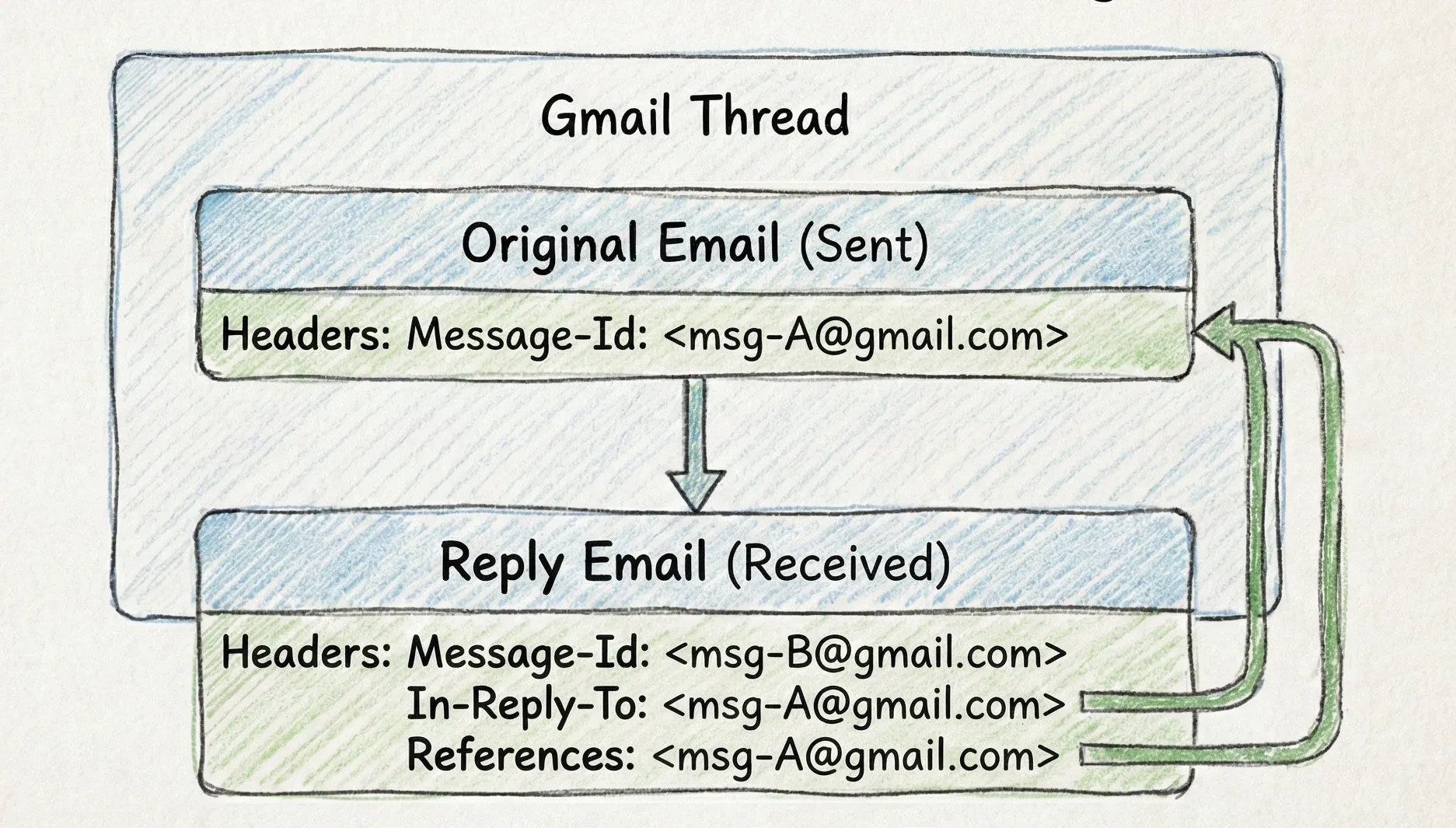
Gmail organizes your emails into threads and each message in a thread has special headers to indicate whether one message is a reply to another message.
When you send an email, Gmail assigns a unique identifier to the email message. This message ID is stored in the Message-Id header of the email message. When someone replies to that email message, the reply message will have the original message ID in the In-Reply-To header and the References header.
The Challenge in Detecting Replies
The logic to detect replies to your emails means comparing the original Message-Id header with the In-Reply-To and References headers of the email messages in the thread but there are a few challenges:
- The Replies may come from a different email address than the original sender.
- Out-of-office replies or auto-replies should not be counted as replies.
- Delivery failure notifications or bounces should not be counted as replies.
- If the original sender replies to the same thread, the message should not be counted as a reply.
It is therefore important to not only compare the Message-Id header but also other headers of each email message in the thread to establish the parent-child relationship between the email messages.
The Solution: Google Apps Script
When you send an email, Gmail assigns a unique identifier to the email message. We’ll extract the rfcMessageId from the email header and later use it to compare with the Message-Id header of the email messages in the thread.
The following function sends an email using the Advanced Gmail Service and then parses the email message headers to extract the rfcMessageId and the threadId.
/**
 * Sends an email using the Advanced Gmail Service to get the ID immediately.
 */
const sendEmailWithGmailApi = ({ recipient, subject, emailBody }) => {
  const userEmail = Session.getActiveUser().getEmail();
  const rawMessage =
    `To: ${recipient}\r\n` +
    `Subject: ${subject}\r\n` +
    `From: ${userEmail}\r\n` +
    `MIME-Version: 1.0\r\n` +
    `Content-Type: text/html; charset=UTF-8\r\n` +
    `\r\n` +
    `${emailBody}`;

  const base64EncodedEmail = Utilities.base64EncodeWebSafe(rawMessage);

  const response = Gmail.Users.Messages.send({ raw: base64EncodedEmail }, "me");
  const threadId = response.threadId;
  const messageId = response.id;
  const { payload: { headers = [] } = {} } = Gmail.Users.Messages.get("me", messageId, {
    fields: "payload(headers)",
  });
  const rfcMessageId = headers.find(h => h.name === "Message-Id")?.value;

  return {
    rfcMessageId: rfcMessageId,
    threadId: threadId,
    messageId: messageId,
  };
};Tip: Store the
rfcMessageIdandthreadIdin a Google Sheet or database immediately after sending the email. This allows you to check for replies later, even if the script runs at a different time.
Detecting Replies with Apps Script
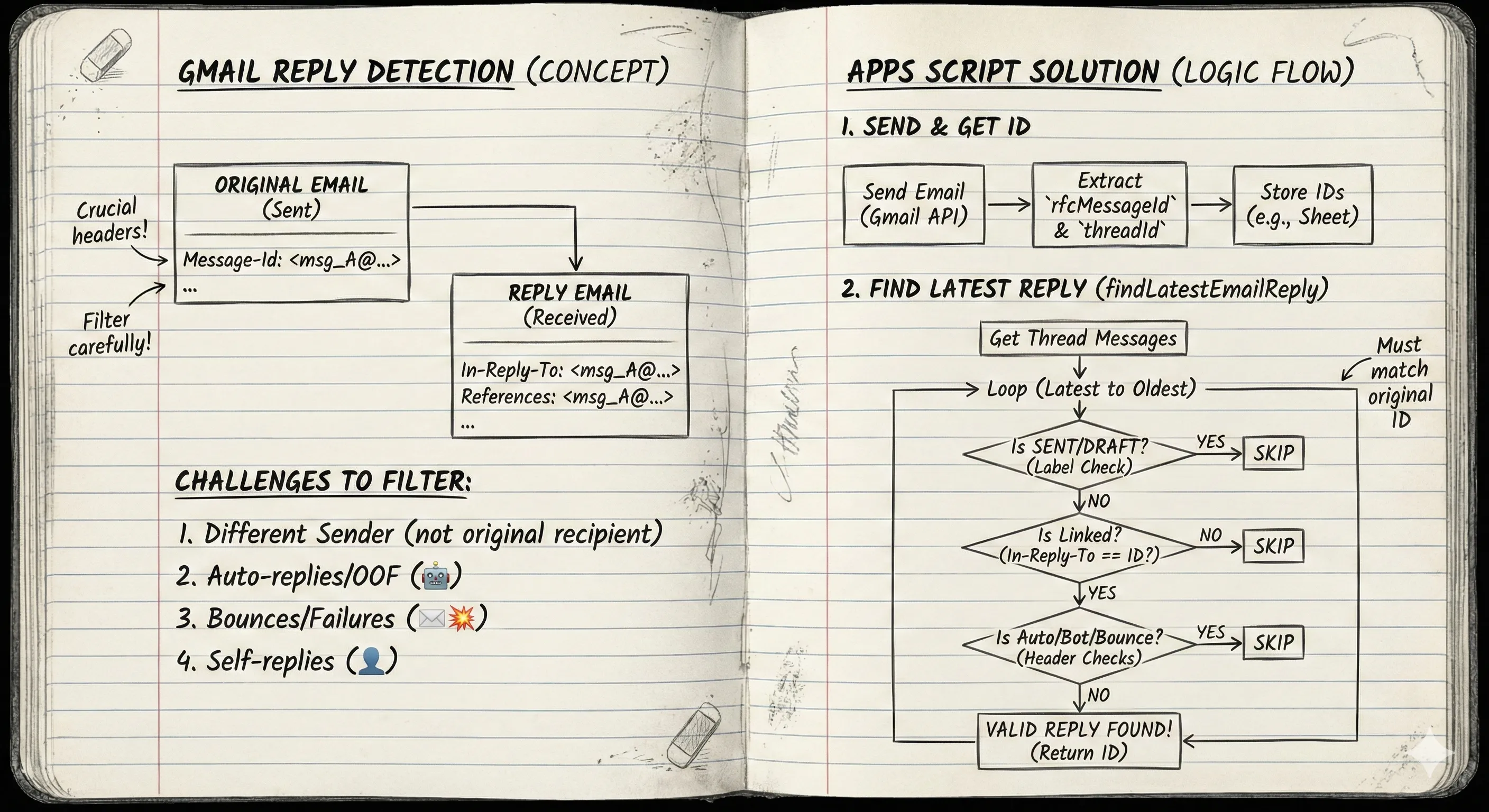
The function below scans the mailbox for emails with the original Message-Id header and then compares it with the In-Reply-To and References headers of the email messages in the thread to detect replies.
First, it gets all email messages that are part of the same thread. It then filters out emails that are not valid replies by checking for auto-replies, delivery failure notifications, and bounces.
The script also filters emails that are in the Sent folder of Gmail since these are emails that you have sent and not replies to your own emails. Similarly, it filters emails that are in the Draft folder since these are emails that you have not sent yet.
If a reply is found, the function returns the ID of the latest valid reply to the original email message.
/**
 * Finds the latest valid reply to a specific message within a thread.
 */
const findLatestEmailReply = ({ threadId, rfcMessageId }) => {
  const { messages = [] } = Gmail.Users.Threads.get("me", threadId, {
    format: "metadata",
  });

  for (let i = messages.length - 1; i >= 0; i--) {
    const message = messages[i];

    // --- LABEL CHECK ---
    // Skip messages we sent (SENT) or haven't sent yet (DRAFT).
    // We are strictly looking for incoming replies.
    if (message.labelIds && (message.labelIds.includes("SENT") || message.labelIds.includes("DRAFT"))) {
      continue;
    }

    // Reduce the headers array into a Key-Value map
    const headersMap = (message.payload.headers || []).reduce((acc, header) => {
      acc[header.name.toLowerCase()] = header.value;
      return acc;
    }, {});

    const msgId = headersMap["message-id"];

    // Safety: Ensure we don't match the original message itself
    if (msgId === rfcMessageId) continue;

    const inReplyTo = headersMap["in-reply-to"] || "";
    const references = headersMap["references"] || "";
    const isLinked = inReplyTo.includes(rfcMessageId) || references.includes(rfcMessageId);

    // If this email is not technically linked to our original ID, skip it.
    if (!isLinked) continue;

    const from = headersMap["from"] || "";
    // Filter 1: Regex for common bot names (no-reply, mailer-daemon, postmaster)
    if (/(mailer-daemon|no(-|t)?reply|postmaster|autoreply|notification)/i.test(from)) continue;

    // Filter 2: Standard header for auto-generated emails
    const autoSub = headersMap["auto-submitted"] || "";
    if (autoSub && (autoSub === "auto-replied" || autoSub === "auto-generated")) continue;

    // Filter 3: Microsoft Exchange/Outlook specific auto-reply header
    if (headersMap["x-auto-reply"] === "yes") continue;

    // Filter 4: Bounced email headers
    if (headersMap["x-failed-recipients"]) continue;

    // If we passed all checks, this is a valid human reply.
    return {
      id: message.id,
      replyRefId: msgId,
      from: from,
    };
  }

  return null;
};
If you want to send a follow-up email to a valid email reply, you can use the previous sendEmailWithGmailApi function but the MIME message should be constructed with the In-Reply-To header set to the ID of the latest valid reply. Also, the References header should be set to the ID of the original email message.






