 Life can get complicated if you operate more than one Google Account and have associated different Google services with different accounts.
For instance I have two Google Accounts - one is associated with Google Analytics, AdSense and Blogger while my second Google Account is connected to Gmail, Google Docs, Calendar and Orkut.
Now that’s a problem because each time I open Google Docs or Gmail, I have to log out from Blogger or Google Analytics because they have separate login credentials. This is so tiring and unfortunately Google won’t let you to merge two separate Google accounts.
If you are also in a similar situation as me, there’s something you can do to reduce your login-logoff cycles:
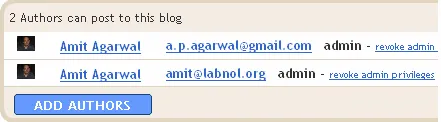
 Blogger: The trick is to convert your blog into a team blog but you still remain the sole author.
Go to Settings -> Permissions and type the email address associated with your second Google Account. Thus you will be able to create or edit blog posts, modify blog templates, approve comments and do everything else using either of your Google accounts since both enjoy admin privileges.
Related: Things To Do When Your Google Account is Hacked
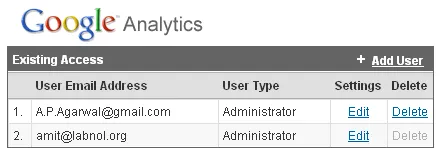
Google Analytics: Like Blogger, Google Analytics also allows you to add new users with administration accounts.
Go to Access Manager inside Google Analytics and click the “+Add User” link - change the access type as “Account Administrator” and you will be able to manage Analytics reports from either Google Accounts.
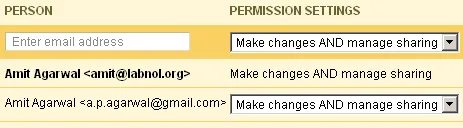
 Google Calendar: Go to Settings -> Share this calendar. Add the email address of your second Google account here and set the permission as “Make changes & manage sharing” - You can then manage your Google Calendar from either account.
 Orkut - While it is not possible to add co-users in Orkut, you can try a different approach - make your main Orkut account a friend of the secondary account. So if you are logged into Orkut using your secondary Google account, you will still be able to view Scraps left by other friends.
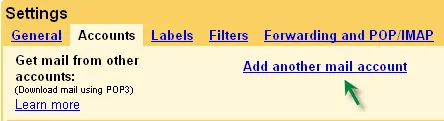
 Google Mail: Gmail offers a useful Mail Fetcher feature that automatically downloads email from one Gmail inbox into another.
You can set this mail fetcher for the Gmail address associated with your secondary Google Account and check emails even when you are not logged in into your primary Gmail Inbox.
In case of Google AdSense, I have setup a couple of CSV reports that are delivered to my Inbox every morning so I do need not check my AdSense earnings manually.
Now the above tricks don’t apply to all Google services (like Reader, Google Docs, Google Maps, etc) so you may want to check out this Firefox hack - Manage Multiple Identities Without Logging Off.






