Digital Inspiration

about    faq    contact

Download All Your Blogs with Blogger Backup, Easy Restoration

blogger backup restoration

Unlike WordPress, there’s no export feature in Blogger that can help you download or backup your blog entries and comments left by readers.

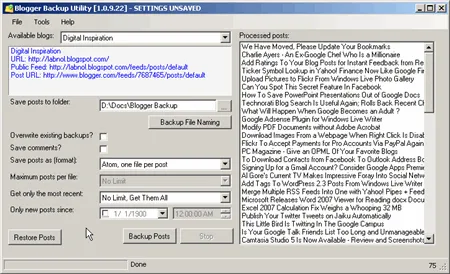
There are however some third-party options and the best among them all is Blogger Backup. This Windows utility that saves your entire Blogger posts to the disk and can easily restore them in case you accidentally delete your blog or some of the posts.

You login with your Blogger / Google account and select one of the blogs that you want to archive locally. You can either save all your blog posts to one file or let the software create new file per blog entry. It can also backup reader comments.

restore blogger blog If you ever want to recover blog posts that are in the local backup folder but deleted from the actual blog, just hit the "Restore Posts" button, select the entries and they’ll be back online in almost no time.

Blogger Backup follows the incremental backup style so if you run the software again after a week, only blog posts and comments published during this seven day period will be downloaded locally, not the entire blog.

Get Blogger Backup at CodePlex.com. Though we covered Blogger Backup some time back, that version did not play very well with the new Blogger but this new release fixes all the previous problems and is extremely fast. Highly recommended.


Email This   Print Article   Save as PDF   Subscribe   Translate 

Published on January 28, 2008 under Blogging, Internet
Tags: , , , , ,

Recommended Google Software:

You may also like to read ..

 · Subscribe to Follow-Up Comments Via Email - New in Blogger Blogs
 · WordPress Users Can Leave Comments in Blogger
 · Moving from TypePad to WordPress Without Losing Permalinks
 · One Can Leave His Blog URL in Blogger Comments Even With OpenID
 · Online Backup Services - Review and Comparison

Reader Comments

#1 Debashish 01.28.08

What I really wonder about is why Blogger.com have stayed away from making its source open, community involvement would have only enriched it. And I wonder why they don’t even have an official tool to migrate Wordpress blogs to Blogspot, while many would want to have such a feature. Other thing I hate is that they don’t have the new XML template system made available to self-hosted blogs, a move to ensure people will stick to their hosted solution.

#2 Brian Humphrey 01.28.08

Mr. Agarwal,

I cannot speak highly enough of the Blogger Backup application. It works superbly and simply, and has given us great peace of mind in archiving our historical content (including comments).

While Google/Blogger should have offered something like this, we have nothing but praise for Greg Duncan, who created the Blogger Backup utility.

Thanks for ‘Digital Inspiration’, which remains a daily must-read.

Respectfully Yours in Safety and Service,

Brian Humphrey
Firefighter/Specialist
Public Service Officer
Los Angeles Fire Department

#3 Michael 01.28.08

Though I have recently signed up with BlogBackupOnline, it’s certainly useful to have a secondary blogger backup application. Once again thanks for the information…

#4 Nadia 04.14.08

Thanks for this posting! I’m from Indonesia and my government blocks web access. It’s time to backup my blog before my president block blogspot :)

Add a Comment

If you have a question that is not related to the above discussion, please post your question in the message board for quick answers. All comments are moderated.


Joing the Facebook Group

Visit Help Central


© 2008 Digital Inspiration - Technology, à la Carte | Mobile Edition | Videos | Terms

The articles are copyrighted to Amit Agarwal and can only be reproduced given the author's permission.

My Google  Netvibes  My Yahoo!  Windows Live  Bloglines  Newsgator  

Skip to top of the page ^^

