If you use the same password on multiple websites, your may be in for some trouble.
Say your password for website badwebsite.com is the same as the password for goodwebsite.com. Now if the website badwebsite.com gets compromised (or the owner is malign to start with), they’ll know your password. Chances are that your username is the same (email address) for both websites so the badwebsite.com people can can easily log in to your goodwebsite.com account and impersonate you.
Yeah, there are quite a few reliable Password Managers that serve as a strong room for your complex passwords but that they require you to install specific software on the computer. What do you do when you want to check your web email on a different computer where you do not have your security tools installed and you do not remember your secure, random, email password?
In addition, I doubt you can memorize all your passwords for each and every website, if they are secure from brute-forcing and unique, that is.
Write your passwords down on a paper
What I am trying to solve is to give users a simple way of generating strong passwords unique to every website they visit using just a piece of paper, credit card-sized, that you can carry in your wallet.
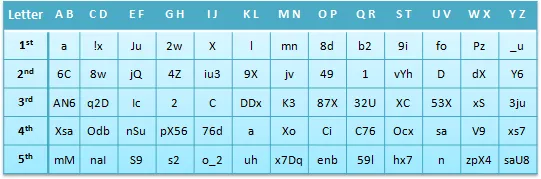
What you need is just a piece that has a unique (per card) combination of secret letters to help you create a unique password for each website. You may use the RAND() function in an Excel spreadsheet to generate unique password cards.
To create a password, take each letter of the website you want to create a password for and then take the corresponding code from the table. For example, if you want to create a password for www.amazon.com, it would be:
1st letter is a –> a (Column 2, Row 1)
2nd letter is m –> jv (Column 7, Row 2)
3rd letter is a -> AN6
4th letter is z -> xs7
5th letter is o –> enb
So the password for your Amazon website becomes ajvAN6xs7enb.
You can optionally (make sure you do this with all your passwords) intertwine the generated password with a memorized password – it could the city name where you were born, your childhood hero, name of your favorite author or anything memorable.
For instance, if you were born in Philadelphia, the password for Amazon.com would be ajvAN6xs7enb intertwined with Philadelphia: PahjviAN6lxs7aenbdelphia. This would ensure that your identity consists of something you know (Philadelphia) and something you have (the paper password card).
Even if a malicious administrator of website badwebsite.com retrieves your password for that website, they cannot impersonate you on say PayPal or Amazon because you aren’t reusing passwords anymore.
It is a bit cumbersome to use if you had to use it to type in passwords each time, but when used in conjunction with your everyday “remember password” feature found in every browser, you get extra security at the cost of just tiny real state in your wallet.
Security involves trade-offs, in this case is between usability, portability and robustness against collusion or more sophisticated attacks. Arguably though, for a vast majority of people, this is more realistic than carrying an electronic password generator.
The writer, Andres Torrubia, is the co-founder and CEO of Fixr, an eBay like online marketplace for homeowners and contractors.
Related: How Strong is your Password ?

Find this article at: http://labnol.org/?p=12972


Reader Comments
I write my passwords on paper. But the little chart with the letters is a brilliant idea.
Written by Blancheys on 03.09.10
That’s great, thanx. I’m paranoid enough that i’d never keep passwords on anything digital – but i wouldn’t have thought of those ingenious (= inventive, and simple from the user end) ways of creating passwords. :0)
Written by mmSeason on 03.09.10
good technique, the only downside is do not lose your card and always carry with you else you cannot access anything.
Written by Pravesh on 03.09.10
Really useful information. I have my own system of generating passwords but it is not as ingenious as this one.It’s mostly related to significant things in my life and a combination of those. Even though I don’t use a different pass for every site, I am trying to have different ones for the most important services I use (i.e. emails).
Written by Radu Panciuc on 03.09.10
Every companies insist on changing password of users frequently say once in 45 days… We have have that habit and keep changing password of goodsites like say paypal,adsense once a month
Written by infopediaonlinehere on 03.09.10
Just make sure you have a backup copy of this cheat sheet locked up somewhere safe. A zip-encrypted scan will do :)
Written by ChieftainY2k on 03.09.10
Interesting, thanks!
Regarding the ‘”remember password” feature found in every browser’
In Firefox, by default the file is un-encrypted and vulnerable.
The password file is encrypted if you use a Firefox master password.
Written by Jeffk on 03.09.10
Hi,
Good, but i am talking browsers creators like Firefox and Google to and and encrypt for passwords and developers to creates ententions for this, i am developper but i don’t have available time for this, i am creating an web app, i like that Amit make a post when it’s available (i don’t give the idea) .
Written by Achraf52 on 03.09.10
This is a brilliant idea. ..but if the website name is of more characters, then we need to have a super huge list..
Written by Krishna on 03.09.10
Amit
Have you tried this? Its impractical given the innumerable sites we have accounts on and the innumerable amongst them which want you to keep chaning passwords regularly…Will we have different tables for each such different password then..?
I have a different model to suggest that I have used to a limited extent.. works great if you are multi-linguist especially (and generally Indians know 2-3 languages!). Associate yr english keyboard keys including special chars mentally to letters in other language. Translate the website name or associate it with a name in that language and generate a passwd intertwined with some phonenumber. Gives u a pwd which is non-dictionary, with mix of specialchars/digits.
Written by Sidharth on 03.09.10
GREAT idea? But how can I teach Excel to generate such random password parts? Do you have a template or something? I don’t get it… :)
Written by plantagoo on 03.10.10
This is not a new idea. At work, i manage 207 servers. Per server there are 4 passwords to be maintained. Periodically i need to change the passwords too. As per our policy the password should have 10 characters, 5th and 9th character should be special character…so..on. I maintain simialr matrix for each password. Thus 4 X 207 passwords are maintained on 4 small cards.
Written by Suresh Nair on 03.10.10
I have been looking for a practical solution like this for a very long time. Very clever work!
Written by Alex. on 03.10.10
Why not a texte file, secured in personal folder with password or a personal computer account ?, or to create a web applications that can generate a picture show our passwords that can be stored,printed,mobilized .
Written by Achraf52 on 03.12.10
>>You may use the RAND() function in an Excel spreadsheet to generate unique password cards.
How?
Written by Ty on 03.12.10


