*This is about updating Firefox plug-ins, not extensions.
If you select Tools -> Add-ons from the Firefox menu bar, you’ll get a list of all extensions, themes and plug-ins that are currently installed in your copy of Firefox.
The same add-ons dialog has a “Find Updates” feature to help you figure out if you are running any out-dated extensions but that doesn’t work with your plug-ins. How do you then find out that you are running the latest versions of all plug-ins?
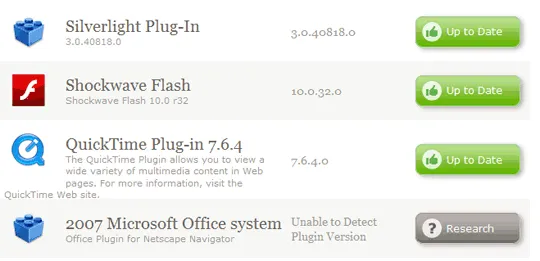
It’s simple now. You can open the Firefox browser and visit the Plugins Check page hosted on mozilla.org. This will create a list of all plug-ins that are installed on your system and will match that data with its own list to determine if you are running an older version that has been marked out-of-date.
In case this online check fails for a particular plugin, you can click the “Research” button to perform a search on Google using the plug-in name as the search query. This is not always accurate but you’ll at least reach the vendor’s website that is officially hosting the plug-in.
It makes sense to visit the plug-ins checker page occasionally because older plug-ins not just make your browser insecure but they also make it more unstable. David Tenser of Mozilla says 30% of the reported crashes are caused by old plugins.






