
Rotate The Video Clips, Don't Tilt Your Head or the Computer Screen

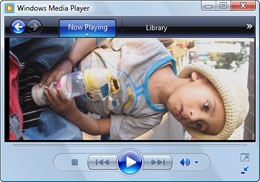 You shot some great video with your digital camera while on vacation with family but the problem is that at times, you were holding the camera vertically.
That video was therefore captured in portrait mode and you have to turn the head sideways each time you watch those video clips inside Windows Media Player or on the large TV screen.
To fix this, you need to rotate the video clips 90 ° to convert them from portrait to landscape mode - any decent video editing software can do this including Quick Time or Windows Movie Maker, one that’s already installed on your XP or Vista computer (under Video Effects).
But sometimes, the default 90 or 180 degree rotation isn’t enough and you need to rotate a video by some custom angle like say 45 degrees. In that case you would need VirtualDub - a lightweight but exceptionally useful video program.
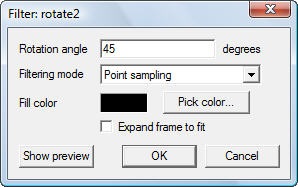 Open the video clip inside VirtualDub and press Ctrl+F to load the filters menu. Now a add a filter that says “rotate2” - this allows you rotate video clips by any arbitrary angle.
VirtualDub supports most video formats and can also be used to straighten videos captured via mobile phone cameras.
Related: Flash Video FAQ, Movie Maker Alternative

Amit Agarwal
Google Developer Expert, Google Cloud Champion
Amit Agarwal is a Google Developer Expert in Google Workspace and Google Apps Script. He holds an engineering degree in Computer Science (I.I.T.) and is the first professional blogger in India.
Amit has developed several popular Google add-ons including Mail Merge for Gmail and Document Studio. Read more on Lifehacker and YourStory























