Digital Inspiration

about    faq    contact

Does Your Computer Take Too Long To Boot Up ?

If your Windows PC is taking a lot of time to start-up, chances are that too many programs and Windows services are configured to launch automatically when you log on.

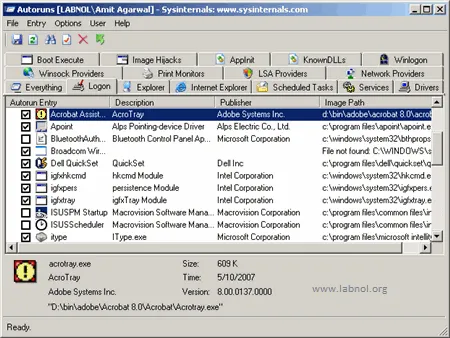
To fix this issue, you can either manually clear the start-up folder and registry entries or just download the excellent Autoruns 9.0 utility from Microsoft.
computer-boot-process

Autoruns shows you what programs are configured to run during system bootup or login, and the entries are in the order in which Windows processes them.

You can select the services, executables and registry entries that may be responsible for the long start-up time and uncheck them to disable.

AutoRuns for Windows

Related: Decrease Boot Time, Shut Down Windows Faster

Email This   Print Article   Save as PDF   Subscribe   Translate 

Published on December 19, 2007 under Software, Tips, Tricks, Tutorials
Tags: , ,

Recommended Google Software:

Reader Comments

#1 David Bradley 12.19.07

Nice find. I’ve used various startup managers/analyzers over the years but this one does seem to be the most comprehensive. A quick look revealed at least half a dozen “hidden” services for floppy disks, IR, and other wonders that are not present on my machine and so totally redundant.

db

#2 Diya 12.19.07

The most valuable tip for me at this moment.Thanks.

#3 Chris 12.19.07

Thanks it is very easy to use. I was wondering, how do we restore it to default if there is a problem?

#4 Pavan Kumar AR 12.19.07

Hi,
You did not say about System Configuration Utility (msconfig). I think this post would be incomplete without stating that….

#5 Praveen Ratna Deepak 12.19.07

@ Chris,

You need not ‘delete’ the start up item in ‘Autoruns’. Just unchecking a particular item will do. In case you have to restore it to default, just check the item you unchecked before.

#6 Brian Cantoni 12.20.07

This is a great utility. Here are a couple more tips I’ve learned:

In the Options menu, select “Hide signed Microsoft entries” — this will hide from view all the Microsoft stuff which is normally okay to leave alone.

The Logon tab covers most of the things that will slow things down at boot time. The Explorer and Internet Explorer tabs are also worth reviewing.

If you see something being loaded (at boot time for example), but don’t know what it is…search for the filename to confirm what it is.

#7 Amit Kulkarni 12.20.07

Just an observation from the above screenshot. It is a tool from sysinternals, a company that Microsoft bought.

Add a Comment

If you have a question that is not related to the above discussion, please post your question in the message board for quick answers. All comments are moderated.


Join the Facebook Group

Visit Help Central


© 2008 Digital Inspiration - Technology, à la Carte | Mobile Edition | Videos | Tech Support | Terms

The articles are copyrighted to Amit Agarwal and can only be reproduced given the author's permission.


Skip to top of the page ^^


