
Change the Font of Command Prompt Window to Consolas

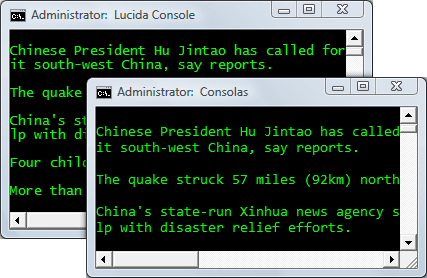
*This screenshot compares text rendered using Consolas vs Lucida Console font.
Microsoft introduced the Consolas ClearType font to improve your on-screen reading experience especially when reading or writing programming code. Consolas, like Courier, is a fixed-width font meaning that all letters are the same width.
 How to get Consolas Font on your computer ?
The Consolas font is available by default on all computers that have Windows Vista or Office 2007. If you are on Windows XP / 2000 or do not have Office 2007, you may download PowerPoint viewer and the font will automatically install on your computer - legally. (See: ”Download Vista Fonts for XP Computers“)
If you own a license of Visual Studio, download the Consolas Font Pack here.
How to set Consolas as the default font in Command Prompt Window ?
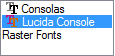 When you open the Properties dialog of your Command Window, the only fonts you may see in the list are Lucida Console and Raster Fonts.
In order to set Consolas as the default font, you need to first add the following font-specific entry to your Windows registry.
Go to HKLM\Software\Microsoft\WindowsNT\CurrentVersion\Console\TrueTypeFont, add a string value (REG_SZ) with the name 00 and put Consolas in the data field. See screenshot.
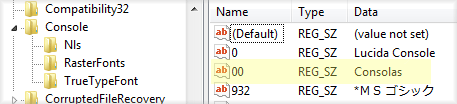
*if you already have two fonts set in the DOS windows, set the name of Consolas as 000 (three 0’s).
Now reboot your Windows computer, open the command prompt window and set the default font to Consolas. Thanks Jeff Lynch.

Amit Agarwal
Google Developer Expert, Google Cloud Champion
Amit Agarwal is a Google Developer Expert in Google Workspace and Google Apps Script. He holds an engineering degree in Computer Science (I.I.T.) and is the first professional blogger in India.
Amit has developed several popular Google add-ons including Mail Merge for Gmail and Document Studio. Read more on Lifehacker and YourStory























