
Speed Launch: Set Aliases for Documents, Programs & Websites

 Speed Launch is a new app launcher from the Office Labs team that lets you assign aliases to your favorite programs, web pages and local documents.
Later, you may just type these aliases to quickly launch the corresponding web page, program or document. Here’s a quick demo for the CNN website.

When you install Speed Launch, an icon in the shape of a bull’s eye gets added to the desktop. You may simply drag-n-drop files, browser tabs, program shortcuts over this icon to setup an alias or give that file a more meaningful and easy-to-remember name.
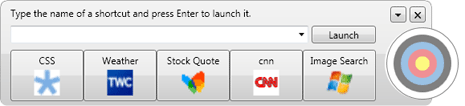
You may also create shortcuts to write search queries. For example, to search Wikipedia just type “Wikipedia Search” and hit enter (it will auto-complete as soon as type the first few characters). Next, type what you want to search for in the new window and hit enter.
When you install Speed Launch, you agree that the application will periodically upload usage metrics to Microsoft. If its not a concern, go ahead an install the software. While it is not a replacement for ActiveWords or Launchy, Speed Launch does look like a useful app especially for keyboard-happy users.
Related: Office Labs - Community Clips

Amit Agarwal
Google Developer Expert, Google Cloud Champion
Amit Agarwal is a Google Developer Expert in Google Workspace and Google Apps Script. He holds an engineering degree in Computer Science (I.I.T.) and is the first professional blogger in India.
Amit has developed several popular Google add-ons including Mail Merge for Gmail and Document Studio. Read more on Lifehacker and YourStory























