
Desktop Widget Reminds You to Shutdown the Computer

Do you turn off the computer when you are done for the day?
Great if you replied yes but if you aren’t in the habit of shutting down the computer at the end of the work day, you aren’t just wasting money (through electricity bills) but the laziness on your part is making an impact on the environment as well. From a 2009 report:
If 100 users remembered to turn off their computers at the end of their work day, this could reduce carbon dioxide emissions by an amount equivalent to taking 2.14 cars off the road in a month.
If all of the PCs in the world are powered down for just one night, this alone would save enough energy to light up the Empire State Building for more than 30 years.
If the numbers ring a bell, you may want to try this desktop widget that quietly sits in the system tray and monitors your system usage like how frequently you turn off the computer and how long does the computer stay idle (powered on but unused) after working hours.
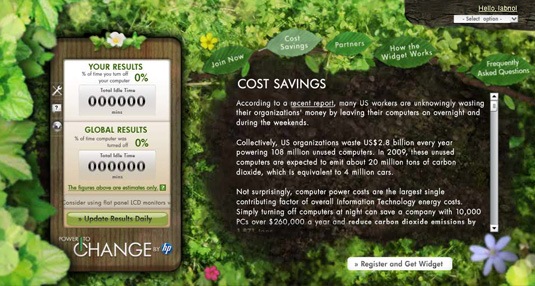
The widget then tries to estimate the amount of energy you may have saved by turning off the computer. It also includes a handy timer that will remind you to power off the computer one hour before the end of the work day.
Now the more interesting part. The widget also uploads your usage on a community website where everyone can see how frequently other widget users in different parts of the world are turning off their computer. It’s a social site so can you also see stats of your friends who too may have installed the widget.
The HP “Power to Change” widget in an Adobe AIR application so it should work just fine on Windows, Mac and Linux machines. The widget will not count time that a computer in standby or hibernate mode as idle time.

Another eco-friendly tip: Use Less Paper when Printing

Amit Agarwal
Google Developer Expert, Google Cloud Champion
Amit Agarwal is a Google Developer Expert in Google Workspace and Google Apps Script. He holds an engineering degree in Computer Science (I.I.T.) and is the first professional blogger in India.
Amit has developed several popular Google add-ons including Mail Merge for Gmail and Document Studio. Read more on Lifehacker and YourStory























