
Setup YouTube Videos As Desktop Reminders

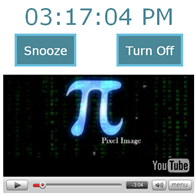
Alarm Tube allows you to assign YouTube videos as desktop reminders. And if you don’t turn off the computer at night, you can use this service as a wake up alarm and start the day to the tune of any of your favorite videos.
Alarm Tube accepts natural language commands similar to Google Calendar. So you can say “in 30 minutes” or “tomorrow at 7:30 PM” instead of typing the full date and time.
Then select any YouTube video and that will auto play in the web browser at the configured time. Alarm Tube is available at highimpactnoise.com
It could be a fun way of reminding yourself to exercise and stretch using any of the fitness videos on YouTube.

Amit Agarwal
Google Developer Expert, Google Cloud Champion
Amit Agarwal is a Google Developer Expert in Google Workspace and Google Apps Script. He holds an engineering degree in Computer Science (I.I.T.) and is the first professional blogger in India.
Amit has developed several popular Google add-ons including Mail Merge for Gmail and Document Studio. Read more on Lifehacker and YourStory























