
Capturx- Take Digital Notes on Paper with Ink Without a Tablet PC

 Some of us prefer carrying Tablet PCs inside meetings or the classroom because they help us capture handwritten notes directly on the computer. And writing with a pen in free-form anywhere on the screen is always convenient than typing a Word document line-by-line.
Now imagine a workflow where the Tablet is replaced by a traditional paper notebook - you write notes or sketch drawings in ink on paper and then transfer the notes onto the computer.
This is possible with Capturx - a kit that comprises of a digital ballpoint pen (only slightly thicker than a regular pen) and a paper notebook.
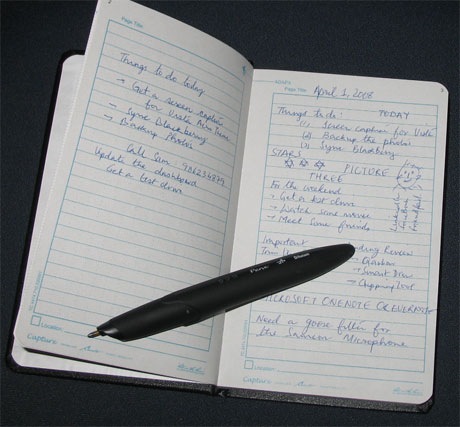
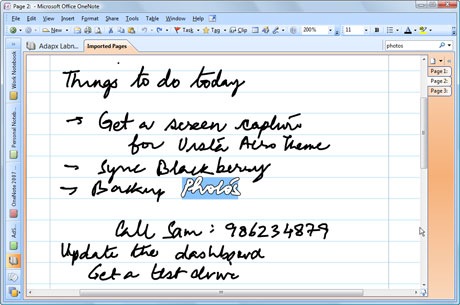
You write on a paper notebook with ink, connect the Capturx pen to the computer (via USB or Bluetooth) and all your handwritten notes are imported into Microsoft OneNote. The whole process is even simpler than transferring digital photos from some camera to the computer.
Once your notes are on the computer, you can search the handwriting or convert it to digital text with OneNote. If you add more text to some existing page of the paper notebook, Capturx will smartly download only the latest changes to OneNote. It actually works like magic.
And you are less likely to run into issues like the notebook running out of battery because the Capturx pen can capture several pages of text in a single charge.
Now the Capturx kit costs $350 and that doesn’t include the price of Microsoft OneNote software. You also need to buy special paper notebooks that cost ~$20 (for 150 pages). And the kit is only available in US though they plan to expand in more countries in 4Q.
The price of the unit (and the recurring cost) is a concern but otherwise, Capturx is flawless and a perfect choice for writing notes without those bulky Tablet PCs - it is not a replacement of Tablets but definitely a useful companion.
Capturx is available at adapx.com. You may also want to check out Warner Crocker’s video demo of Capturx while Kathy Jacobs has a detailed tutorial on troubleshooting Capturx.

Amit Agarwal
Google Developer Expert, Google Cloud Champion
Amit Agarwal is a Google Developer Expert in Google Workspace and Google Apps Script. He holds an engineering degree in Computer Science (I.I.T.) and is the first professional blogger in India.
Amit has developed several popular Google add-ons including Mail Merge for Gmail and Document Studio. Read more on Lifehacker and YourStory























