Google Chrome is a beautiful web browser with some very innovative features. This month, Google also launched a brand new version of the browser (Google Chrome 3) to celebrate the first birthday of their baby.
Interestingly, Google Chrome is the only Google product that shed the beta label just months after the first public release while, for comparison, Google Docs stayed in beta for 3 years and Gmail took 5 years to graduate from the Google Labs.
What’s Missing in Google Chrome
Google Chrome has been around for more than a year with three majors releases but there are few very basic features that should have been there from day one but are still missing in Chrome. I am not talking about extensions or toolbars here, just the very simple stuff:
1. Subscribing to RSS Feeds – If you are reading a blog inside Chrome and wish to subscribe to that blog inside Google Reader, you either have to install bookmarklets or need to manually copy-paste the URL into Google Reader. There should be a simple way.
2. Shortcut to Exit Google Chrome – Like all other Windows applications, Chrome supports the Alt+F4 keyboard shortcut to help you close the current Chrome window. However, if you have two or more instances of Chrome running simultaneously, the only way you can close them all is with your mouse (click the Tools icon and choose Exit). A shortcut key to access that tools icon would be great.
3. Email a Page or Link- The good old email is still the most preferred mode for sharing web pages on the Internet yet Chrome offers no native option for sending pages or hyperlinks by email.
4. View Image Properties – Unless you know how to interpret HTML, it’s hard to find basic properties like the dimensions or the file size of any image that’s displayed on a web page inside Chrome. Google is probably trying to keep the contextual menu in Chrome simple but a menu item like "Image Properties" is extremely essential.
5. Creating Bookmarks – You have a bunch of tabs open in Chrome but have to close the browser so that someone else in the family can use the system. How do you save all your bookmarks to a folder so that you can easily resume work later?
6. Reading Blog Feeds – It’s not uncommon to find search results in Google that point to RSS feeds. Opera is brilliant at rendering raw RSS feeds, Firefox will auto-open the feed in your default RSS reader, IE will show a formatted view of the XML file but raw feeds in Chrome are often difficult to understand.
7. Get the Page Title – In IE or Firefox, if you ever need to copy the title of a page, you can simply do a right click and choose "View Page Info". A similar feature is available in Chrome but it would only tell you about your last visit to that site. How do I get the title of that page without looking at the HTML source?
8. Web History – If you look at your browsing history in Chrome (Ctrl+H), the sites are listed in the reverse chronological order with the most recently visited pages listed at the top. The information is however not grouped by date or domain so how do you determine what pages on the xyz.com domain did you visit last Friday?
9. Download Manager – While Google Chrome removed the status bar to save expensive screen estate, the built-in download manager takes up much more space in the status-bar are. There should be a way to run downloads in the background or the download bar should disappear automatically once the downloads are done.
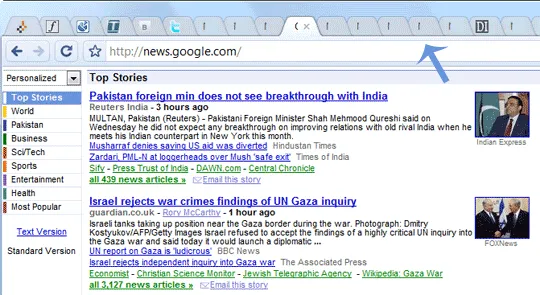
10. Confusing Tabs – If you are a power user and open too many tabs in Chrome, it becomes extremely difficult to figure out what’s there inside each tab because Chrome will hide the favicons and shrink the existing tab to make space for more tabs.
Related Tip: How to Create Profiles in Google Chrome

Find this article at: http://www.labnol.org/software/google-chrome-problems/9881/
Tags: best, feature, google chrome, opinion, Software

Reader Comments
Yes Amit,
You are right. Hope chrome team will make a note of all and will fix it soon. :)
Thanks
Sankar Datti
Written by Sankar on 09.16.09
The above described features are some basics needs we deserve from the browsers like that of viewing feeds,right click view images and its properties but the most awaiting things are the extensions (though it only available for the beta and developer versions “3.0.195.21″).
Written by Honey Singh on 09.16.09
Hi,
Very nice article, I love Chrome and I too get annoyed with those missing features you mentioned.
Here are a couple of workarounds, hope it helps:
1) There’s an User Scripts that displays a RSS icon next to the URL, a la Firefox, if you have User Scripts enabled
4) What I do is right-clicking an image and open it a new tab. The tab will tell the height/width. Not perfect, but helps!
Written by Bruno on 09.16.09
hey that is good observation, i guess you were waiting for crome get non beta, and then put your ideas . he he may be uc …excellent i love this post , I think crome should read your post..
Written by Rishi on 09.16.09
Some more things which im missing in Chrome
1. Cant save web pages in .MHT format (Web archive). This is useful to avoid creation of folders when complete web page is saved.
2. When i try Bing Visual Search, some images dont get loaded on a couple of occasions (they remain white).
3. Poor search / pattern matching in “Search downloads” (Ctrl + J), ironically search is always the best with google in other apps like Google Desktop.
4. Difficult (impossible?) to access cache for intermediate/broken downloads.
5. If an image is not loaded on a web page, there should be a context menu which i right click on the image to just re-load the image (rather than refreshing the entire page).
6. Cant automate routine tasks (no macro support)
Written by Ananth on 09.16.09
Chrome runs downloads in the background.
Written by rainman on 09.16.09
1) There’s an extension for that: link
2) Never needed to do that myself.
3) Shouldn’t be part of the browser. You can do it with a bookmarklet.
4) Can be done using “Developer tools”.
5) Just close the window, you can resume your session from the “New tab page”.
6) Again, an extension is availible.
7) Ok, this one is an annoyance. I usually hit the star button and copy it from there.
9) Downloads disappear when done in the dev builds.
10) It’s by design, most current browsers have the same problem, and Firefox hides tabs completely, at least Chrome and Opera show them whenever possible.
Written by Mateo on 09.16.09
Very soon i believe google will introduce all the above mentioned features
Written by Sean on 09.16.09
I think you can use Ctrl+F4 to exit individual tabs without using the mouse or the tools-exit option.
Written by Joshi on 09.16.09
Chrome is just a joke. Its not as user friendly as firefox or IE.
I would prefer IE than chrome. I am using chrome right now, and I am regretting it.
Going back to IE after clicking Submit Comment.
Written by Amity on 09.16.09
Generally in the Microsoft Windows world, – usually closes the application and – or -W usually closes the current tab. I don’t know about Mac and *NIX conventions.
Hope this helps.
Written by Al on 09.16.09
I wasn’t a good Google Chrome user eh? I didn’t notice that Chrome has a lot of missing features which other browsers have. Well, I know Chrome isn’t capable yet of having add-ons, but the other features I haven’t noticed. OR maybe I am really not using those features in the first place when I was using the other browsers (i.e. subscribing to feeds) .
Written by boca marketing on 09.16.09
I agree with Mateo on most of the point. Can’t say I know anything about extensions. For 7. I use the same workaround and 2 is not really an issue.
If you want to pick on something, a bigger problem is having to use command line flags instead of a proper options page:
link
Written by gxg on 09.16.09
Constructive critisim is good, but these just seem ‘petty’, I think no 8 is the only real usability issue. But then again I’ve not tried searching the history, so I can’t say for sure.
1,3,4,7 just add gui clutter without actually giving new features.
1 & 3 copy the url (google doesn’t have to then guess/workout what’s email/reader you wanted to use at that point)
4 use the dev tools already in place
7 again in the dev tools (why would any one being doing this enough to need a quick way of doing it???)
Written by Chris on 09.17.09
Many thanx for this. Since most of my online life is about blogs – and i’m a big keyboard-shortcutter – i’ll leave Google Chrome until a version comes out with those features. Haven’t the spare minutes for fiddling with workarounds. Now i know!
Written by mmSeason on 09.17.09
Nice feature requests,
RSS is definitely a feature, that has to be builtin especially considering the real time age we livein.
For the time being u can add RSS as an extension. for more details on how to get extensions enabled and the RSS extension visit my blog here link .
Try Alt F+x for a quick exit. it works for any app on windows.
Written by Saravanan on 09.17.09
Hi, Amit
What a wonderful observation. Thanx for this nice post. Let Google to do the needful.
Written by Sujith on 09.18.09
One reason that’s preventing me to switch to Chrome is serious lack of add-ons. Aren’t there any written so far or it just doesn’t support them?
AdBlock Plus, Cooliris, CustomizeGoogle Options are few things which I can’t live without.
Written by Manu Manjunath on 09.18.09
I think there’s another thing missing. You can’t block certain site with Google like what you can do with Internet Explorer, can we?
Written by Yanto on 09.18.09
Google Chrome really lacking extensions and RSS feed support apart from it renders the pages very fast.
Written by venkat on 09.18.09
Chrome also doesn’t have a save tabs feature .. yet.
Written by Sharninder on 09.19.09
Maybe, this is why it is a small download and light. And they want it to be extremely fast rather than putting all the things in it and making it slow.
If you have read the Chrome comic strip, they said that they are building it from the scratch. I wish that they look at the feedback of the users and develop on it.
Written by Azamat Ali on 09.19.09
MISSING!
shortcuts to certain programs you might want to run and an ad blocker.
But…
We wont see an ad blocker because Google makes there money from advertisements, sad, because the interests of the company are in contradiction of the perfect web browser.
Written by Noodles on 09.19.09
There’s another thing. On Twitter or any other site we can’t view the image background without downloading it.
Written by Jose Portugal on 09.20.09
Ctrl+U view source like firefox . better than IE because IE have not shortkey for view HTML Source
Written by Stunt on 09.20.09
I see my previous post got mangled, so I’ll try again.
Generally in the Microsoft Windows world, Alt-F4 usually closes the application and CTRL-F4 or CTRL-W usually closes the current tab. I don’t know about Mac and *NIX conventions.
Hope this helps.
Written by Al on 09.21.09


