Desktop Sharing and Remote PC Access with Team Viewer

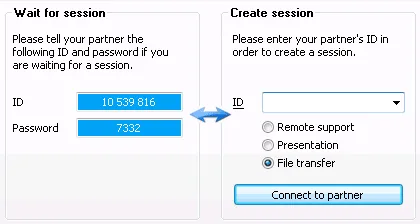
TeamViewer is a simple Windows software that lets you access any another desktop computer that is connected to the Internet.
You can use TeamViewer for providing remote tech support, running live presentation demos on the clients computer or for transferring files between two computers - like your home PC and the Office laptop.
Team Viewer offers an advantage over other desktop sharing applications - you can even run it on computers that do not have admin rights because the client software requires no installation.
The software allows only one type of task per session - you can either remote control your partner’s computer or display your own desktop screen to the partner or transfer files without sharing the desktop screen.
www.teamviewer.com - Free for personal use. Thanks Dutt.
Previous Reviews: CrossLoop, Adobe Brio



Hi,
I would also recommend Techinline - it is the easiest tool for remote support I’ve ever seen.
Team Viewer is a great application . I use it frequently when I want to fix something on my Mom`s pc or explain something to a friend. It is also easy to become acquitted with - so far my experiences with the software are only positive + its free.
I’ve seen various other remote desktop connections, but this is by far the simplest!
In this, here is one more interesting thing I found today for C++ developers. teamviewer full C++ source code is available at its official site.
If you need much more control and customizations on this tool, Now you can modify the source code, recompile and use it for your custom needs.
But before that please have a look at license agreement. Source code url:
http://www.teamviewer.com/download/TeamViewer_Source.zip
Thanks,
Dutt
