See update: The Best Twitter Desktop Apps for Windows
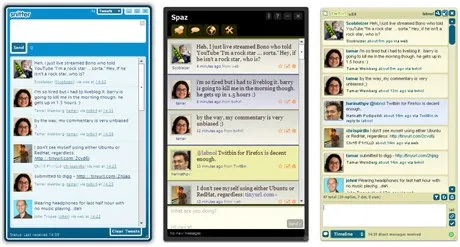
Snitter, Spaz and Twhirl are pretty good desktop clients for Twitter - all of them use the Adobe AIR platform and can therefore run on Mac, Windows and Linux.
 They are all very similar in features but if I were to pick one of the three, I would probably go with Twhirl - it sports the most elegant interface of them all and you can add multiple Twitter accounts.
Hover the mouse over the avatars of your Twitter friends and you get access to various options like direct messages, replies, etc.
And Twhirl is probably the only Twitter client that lets me change the font of tweets. Thanks Tamar.






