Creative Docs - Free Alternative To Adobe Illustrator or Corel Draw

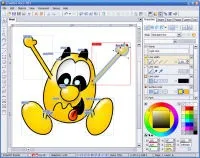
Creative Docs .NET is a versatile vector drawing software on the lines of Adobe Illustrator or Corel Draw - the software is completely free for non-commercial use and also supports Windows Vista.
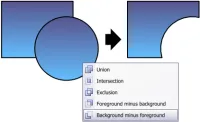
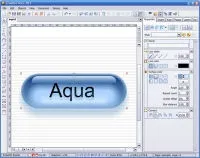
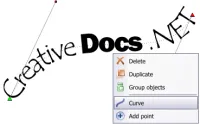
Though available without charge, Creative Docs offers tons of goodies seen only in commercial software - you can draw text along a curved path, merge shapes using boolean operations, convert text into Bezier curves, color gradients, etc.
Creative Docs can also be used for creating optical illusions, drawing flow charts or for writing manuals like you would do inside Microsoft Word. The finished document / graphic can be saved in image formats or as a PDF document.
CreativeDocs.NET | Download Files | Blog | Thanks Greg.


You forgot about Inkscape. It’s very powerful (suitable for all vector drawing), though slightly buggy (it is still in ver. 0.45.1). I’m a designer and I use it for all my work.
Inkscape? Just try using on windows with a tablet and you’ll quickly see why people would love to see a serious alternative. I think I’ll give this app a try.
Can it open/edit .cdr or .ai file?
Inkscape may have an early version number, but it is NOT particulary buggy. Atleast I haven’t encounterd many problems with it (if any in stable versions).
This one doesn’t seem to output svg.
Creative Docs .NET cannot open AI or CDR files, nor can it import or export SVG files [sigh]. I’d love to find the time to implement at least SVG support, which could be a good starting point to open Creative Docs to the world.
I’d have to agree with some other posters here that Inkscape is a superior alternative vector drawing application. It is available at no cost WITHOUT any usage restrictions, and its native file format is an industry standard (SVG). It can also work with Postscript and AI files, and with the (also free) UniConverter plug in you can also import CDR.
If “JohnC” is not satisfied with Inkscape he would not consider Creative Docs.Net as anything NEAR a serious alternative. Nonetheless I think both are perfectly adequate for casual users
I agree with JohnC’s sentiment; I love inkscape, but it’s unusable with a Wacom tablet at the moment on windows (as is the Gimp - it’s a GTK issue). I don’t understand why fixing that is not a priority for them - after all, it’s a critical step required for truly opening them up to a professional crowd [who DOESN'T use tablets for artwork professionally?]
Is it just me or what? I can’t even open/import any kind of image files in this software. Ironically it can export them out in different formats of image. :(