How to Verify That You Have Typed In The Correct Password

When you type your password on a website, all you see are asterisk (*) signs. That is probably a security measure in web browser to prevent people, sitting next to you, from finding your password.
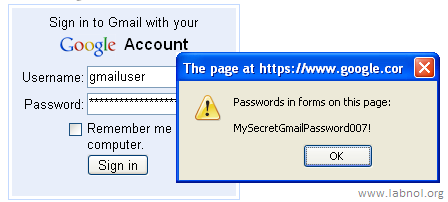
But there are cases when you would really want to know the exact characters that you are typing in the password filed.
For instance when logging into your online bank account, if you type the wrong password more than three times, the account access could be locked for the next few hours. And it’s not uncommon to make typing mistakes especially when you have a long password.
A simple solution to prevent password typo errors is the show my password bookmarklet - just drag the link into your browser bookmarks.
Now the next time when you login into some website, just type the password and click the “show my password” bookmarklet before hitting the Submit button - this will reveal the actual password characters, not the asterisk signs. (see screenshot)
So you can very easily confirm that the password you are just about to submit is the right one. Some more bookmarklets for web forms are available here. Thanks Mark.
Related: Useful Bookmarklets, Generate Strong Passwords

I would be very careful in using such a third party applet. It may be genuine, but the risk is always high. And the right(risky) example has been given in the post - internet banking.
The banks urge you not even to write your password elsewhere.
What are the odds that while you are checking your password using this tool, someone has a look at it?
Are these bookmarklets safe? How can we choose reliable and authenticate one?
Instead of using a third party bookmarklet you could just type the password in your browsers address bar and do “cut&paste”…
The applet looks very dangerous. I echo vivek’s thoughts. I will never use this kind of applets with any of my precious passwords. Even the built-in password manager tool of firefox is hacked, if you remember.
or, invest in an excellent password manager/form filler like Roboform.
what vivek says is true. password is the ONLY protection we have to make sure private information is kept private & secure. Therefore using these type of software is very risky.
We should try to memorize our password seven though it seems we forget things in our busy lives. Human brain is very much capable in that area :D
I agree with Vivek !
show my password - from the makers of send my password
Folks, this is just a simple javascript bookmarklet (not a Java applet) that only reveals what you have typed in the password field - and it does so on the client side.
Am not sure why you think that it’s unsafe ?
I do echo my thoughts with others here. However, on trying it out with a dummy mail id, it did not seem to work. Nothing’s showing up..
I am a Cisco network engineer, and when I do my password changes every 3 months, I have a master copy of my passwords on a document, and I always cut and paste it to the Cisco console. This way I cannot mistype the password and lock myself out!
@ all thanks for sharing your views. I am happy that many people agreed with my views.
If if there is no hacking threat, there is a chance that people can see your password when you are playing around with this tool. And believe me , once you get used to such tools, you tend to depend on them. that is exactly how you forget things. It is indeed true that human brain can remember a lot of data.
for those who have too many passwords to manage , there is a product from chipdrive.de for managing passwords on a smart card. check it out.
You can also write most popular greasemonkey script to do the same.
@ All look at the simple code provided by Amit.
javascript:(function(){var s,F,j,f,i; s = “”;
// Iterating through all the forms of current webpage
F = document.forms; for(j=0; j<F.length; ++j) { f = F[j]; for (i=0; i<f.length; ++i) {
// If any element type is password i.e. if any password field is there on webpage take the value of password box in variable called ’s’
if (f[i].type.toLowerCase() == “password”) s += f[i].value + “\n”; } }
// Finally Show whatever is there in variable ’s’
if (s) alert(”Passwords in forms on this page:\n\n” + s); else alert(”There are no passwords in forms on this page.”);})();
harmless code











