You may find this technique useful even if you are not a very tech-savvy user.
Before getting into the actual process, let’s look at a couple of real-world situations that explain why you may want to turn your home computer into a web server.
Situation #1. Say you have music MP3s, documents and other important files on the hard drive of your home computer. If you turn this home computer into a web server, you will be able to access all these files from office or any other Internet connected machine including your mobile phone.
Situation #2. You have some personal photographs that you want to share with other family members. You can either upload these pictures online to a site like Flickr or better still, just convert the computer into a web server. Now you can connect the camera to the computer, transfer the digital pictures to some designated folder and they’ll instantly become available to your friends and family anywhere in the world.
Situation #3. You want to host a website on the internet but the web hosting jargon like FTP, DNS, etc. is way too complex for you. The workaround therefore is that you setup a web server on your home computer (it’s easy) and then host a website in seconds without spending a single penny on external web hosting services.
Now if any of the above reasons look convincing enough, here’s how you can convert your Windows, Mac or Linux PC into a web server in less than two minutes – no technical knowledge required.
Go to labs.opera.com, download the Opera Unite software and install it. Congratulations, you are now running a web server on your machine and just need another minute to configure local file folders that you want to share with others over the internet.
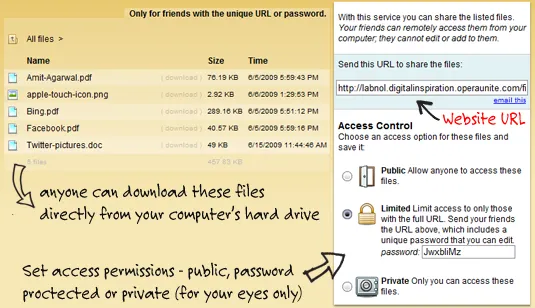
Here’s an illustrated screenshot of the configuration panel – nothing technical here again.

Start the Opera Web browser (yes, that’s also you web server now) and enable the Opera Unite service from the lower left corner. Now double click the File Sharing link and select the folder whose content you want to share on the web. Any file or folder inside this folder can now be accessed over the internet – you can either use a public URL or specify a password for private sharing.
The following screencast video has more detailed instructions on how to get started with Opera Unite or you may refer to the User Guide if you get stuck somewhere.
Opera Unite looks pretty useful but there are other services around that can also do pretty similar stuff. For instance, both PurpleNova and Dekoh Dekstop enable users share content on the Internet directly from the hard drive without having to upload it anywhere.
Update: It’s important to note that your computer must be in running state and also connected to the Internet for others to download files and web pages since Opera Unite streams content directly from your machine – it doesn’t upload or caches anything to its own servers. Give it a shot. [flickr]

Find this article at: http://www.labnol.org/internet/turn-home-computer-into-web-server/9111/
Tags: best, feature, guide, opera unite, web hosting, Internet

Reader Comments
Opera Unite is very alpha with security best described as… will be there in future. Shouldn’t go anywhere near important files.
Written by Rarst on 06.16.09
wow, that is an amazing piece of technology. Somehow I have this feeling this might be the next bittorrent.
Written by Hobbes on 06.16.09
Any ideas if it can be configured when we are behind a router ?
Written by Krishna on 06.16.09
There is a much easier solution, I guess this is more suited for the advanced user try HFS at rejetto.com/hfs/
Update on HFS: You can use HFS (HTTP File Server) to send and receive files. It’s different from classic file sharing because it uses web technology to be more compatible with today’s Internet. It also differs from classic web servers because it’s very easy to use and runs “right out-of-the box”. You can access your remote files, over the network and HFS has been successfully tested with Wine under Linux.
Written by Pradeep on 06.17.09
Very interesting topic. But how do i access my home web server from outside? Do opera wil give us like a public domain?
Written by getvideo on 06.17.09
@getvideo
yes opera gives you a unique public domain, and it doesn’t even matter if u have a static or a dynamic ip address.
Written by Supreet on 06.17.09
Its good but my only worry is its vulnerability to malicious virus attacks.
Written by edunetsys on 06.17.09
“Any ideas if it can be configured when we are behind a router ?” – Yes, if a direct connection fails for some reason it will fall back to opera proxy servers.
“Very interesting topic. But how do i access my home web server from outside? Do opera wil give us like a public domain?” – You setup a myopera account and when you share something they give you dynamic DNS resolution. The final url is something like ..operaunite.com
Of course if you have your own domain and UPnP support in your router in theory you don’t need anything from the opera domain.
Written by null on 06.17.09
I gotta tell ya, at first I thought you were going to explain some easier way of getting apache up and running. The whole Opera Unite thing threw me for a loop. What Opera has done with its Unite is truly innovative. Thanks for the blog post.
Written by Brian on 06.18.09
IIS comes with windows and can be installed in probably less than 2 min, or configured to install with the operatating system itself. Apache is relatively quick too. From then, you could be doing this same thing after less than probably 10 or 15 min of asking google, bing or whatever. While doing this will take more than 2 min, you will learn something, namely “the right way to host a website” and you won’t have to download a crappy browser to get it done. The “quick and easy route” is often the wrong one. If they said, “you too can fly a plane without learning how in just 2 min and all you have to do is get this free ‘open source’ plane that probably is used by like 15% of other ‘flyers’”, do you think that would be a good idea?
Written by minnesota slim on 06.18.09
I guess you don’t use tabbed browsing, pop-up blockers, integrated search bars, speed dial or a RAM cache either. Yea, those Opera guys never have a good idea. Theres the wrong way and the right way to do things, and the right way involves foregoing innovation and doing things the hard way…you know, like they did it 10 years ago. In fact, forget using a graphical interface and a mouse, if you’re not programming your computer in machine code you’re just taking the “quick and easy” way out.
oh, and “crappy browser?” Really? What a…
“Hey you kids, get off my lawn!”
Written by zac on 06.19.09
The opera unite services are implemented pretty well given the fact that they are in alpha, But it really is not useful for majority of the people using the internet.
To get a good idea of the Opera Unite see the discussion here link
Written by Saravanan S on 06.19.09
Doing this is not a good idea for the electrical grid. Much better for a few hundred servers to serve this type of content than a million home computers forced to idle 24×7 to make a few MegaBytes each, accessible.
Written by Pietro on 06.19.09
Browser bloat. It used to be that every application bloated until it was an email client. Now the new goal is for every application to include a web server. This is just another way for attackers to gain access to your computer.
If you want to serve web pages, install a web server or use a hosting service.
Written by Itedarian on 06.19.09
Nice app and good file sharing concept. This gave me the idea of setting up this same thing using apache/https/dyndns and user authentication with htaccess :)
Written by greg on 06.19.09
Next step: wait for
(1) Email from your family complaining about the really slow throughput from your server because your ISP gives you an upload rate far slower than your download rate, and
(2) your ISP to cut you off because your Terms of Service prohibit running a server from your home.
Those of you who have decent upload rates and whose ISPs are reasonable… I’m jealous.
Written by James on 06.19.09
Wow that’s really great, yes it is a bit of bloat in the browser – until you actually run it and realize that it loads up faster than any other browser, and is so much more lightweight than all the competitors even with the bloatware.
Written by Television Spy on 06.19.09
@zac
I understand what you are saying. Yes there are inovations in web browsing that were not introduced by IE. I love tabbed browsing, which IE stole, pop up blockers are ok, but annoying if you surf responsibly in the firs place in the sense that even if you hit a site that does, it wasn’t something that was going to f$$%^& your computer, i can close an add (btw I do use that ’stolen’ feature in IE, I just hate it). But comparing the ‘right way and wrong way’ to do things to 10 years ago? Please? the ‘right way’ is 10 times easier than it was back then regardless of who thought of it first, and the fact is that the ‘right way’ does not involve ‘programming your computer in machine code’. In fact several innovations that you may have missed I guess have made this much easier, which brings me back to my first point, this is easy enough already without making it ‘2 clicks of a mouse’ easy, and complicated enough that you should probably know a bit about what you are doing before you do it… that’s all I’m trying to say. And as for ‘crappy browser’ as I stated earlier, I was using a tone with that statement that was unecessary. Opera is a fine browser, however, why bother, now that IE has ’stolen’ all the basic technology, just use what most of the rest of the world is using is what I would think….
“hey, you people stuck in the past get off my lawn already…”
Written by minnesota slim on 06.19.09
Hey dude, thats surely something wonderful… I would love to have my own system as a webserver. The only problem,that seems to arrive is my slow internet connection. For this, we would need a fast internet connection. :)
Written by Sunit on 06.20.09
This one of thing I was looking for but besides this how do I can share my screen? I mean I want to my friend have full access to my screen so he can help me on work. It will be great if I can do that by Yahoo messenger or AIM or Live messenger.
Written by Ankur on 06.20.09