Consider this: You are an expert in new technologies and have been invited to deliver a presentation at a conference (say, BarCamp).
You prepare the slides using PowerPoint and then upload them on to SlideShare so that audience has immediate access to the material. The organizers have also put a video camera in the conference room to live-record your presentation which they later upload to YouTube.
Once you’re back from the conference, you embed these PowerPoint presentation slides and YouTube video(s) into your blog so that people who could not make it to the conference, are able to run through your presentation.
Sounds like a perfect plan but there’s a small problem here - your PowerPoint slides and the audio-video recording are embedded separately and your readers will therefore have no idea when to move to the next slide.

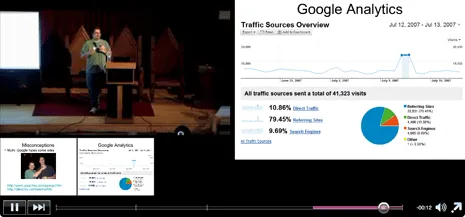
Fortunately, this age-old problem can be solved in minutes with Omnisio - a free service that lets you synchronize pre-recording audio-video with a PowerPoint presentation.
Think of Omnisio as a free web version of Adobe Presenter (or Macromedia Breeze) - you upload your PowerPoint presentation to Slideshare, video to YouTube and then synchronize the two with Omnisio.
Also read: PowerPoint Presentations: Avoid Last Minute Surprises
You can also add annotations to the combined presentation so that viewers can easily skip slides and video together. And with all these wonderful features in Omnisio, there’s absolutely no learning curve.
To experience this yourself, here’s are a demo PowerPoint Video recording that is actually streamed from two different sources - YouTube and Slideshare.
[Update] Google acquired Omnisio and it is no longer available.






