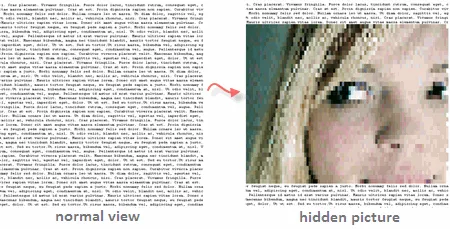
Erik Kastner has created a cool tool to hide images from normal view.
When people open a web page containing an hidden image, all they see is some plain text - the actual picture is revealed only when they select the entire text with a mouse. See example above.
Your image is first converted into ASCII Text (colored) but rendered on the web page as black text with a white background. Now when you highlight a selection, they change the background color using some CSS property and that reveals the image.
Play with the tool at Erik’s site [Hide an image in HTML].

Related: How to Hide Documents and MP3 Files in JPG Images
Find this article at: http://www.labnol.org/internet/tools/hide-images-on-website-from-view-with-text/2227/
web: http://www.labnol.org/ email: amit@labnol.org


Reader Comments
hey, that’s a perfect tool :) Well done
I have a question. If ı want to use this tool for security reasons (for exemple a copyright issue) is there a way that will block the text to be copied by this methode?
Thanks in advance
Written by Moti on 02.06.08
That’s going to spoil the look of the page! Moreover how people are going to know that they can see a picture if they click on it? Seems to be more like a kid’s affair! Anyways, the concept is good.
Written by WHY CORNER on 02.07.08
Now that’s a lot of fun! Found this while Stumbling; thanks for sharing!
Written by Rick Beckman on 02.10.08
@Moti: Why would you want this for security reasons? Are you scared of sharing your work with the world? Do you not trust people at all?
Besides, I just screenshot your page, stick it into Office’s document OCR, and I have text. Regardless of what you do to protect it, nothing beats the screenshot.
Written by Copyer on 02.15.08