Creating Strong But Memorable Passwords with Inkblots

Inkblot Passwords is a Microsoft Research project that helps users create and remember strong passwords through a set of visual clues.

To create a password, you are a shown a random set of images - you look at each of the image, think of some associated object and them type the first and last character of that object’s name.
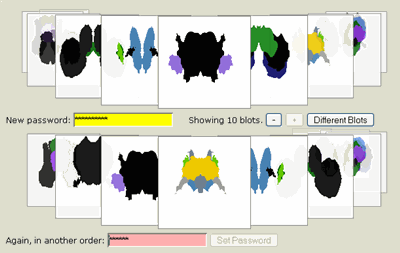
random strong password

For instance, if the first picture is of a black cat, you can type “bt” in the password field. You then advance to the next picture and so on to create a 20 character random and strong password.

Whenever you are asked to log in, you will be presented with the same images (inkblots) to remind you of your associations.

Though it may be tough for most of us to rely on memory for such long passwords, the research paper says that most users find the mental images they associate with the inkblots hard to forget.

InkblotPassword.com | Inkblot Authentication [PDF]

Find this article at: http://www.labnol.org/internet/tools/create-strong-random-passwords-visual-clues/1893/

web: http://www.labnol.org/ email: amit@labnol.org


Reader Comments

I don’t know .. while it sounds like a great idea and helpful service I would be personal very careful trusting MS with my passwords.

Unfortunately they are never been known for a “security minded” company and their soft is bug ridden more then most … there are alternatives I would consider first …

Alex

Isn’t it a bit on an antitheses to the very concept of ‘passwords’?

I find that if I try to create a mnemonic for remembering a password I made I usually forget what the mnemonic is, this just sounds like the extreme version of that, and I was never any good at inkblot tests ;-) As an alternative, Labnol readers might like to try out my passwords for scientists tip, which sidesteps the issue of mnemonics but produces very strong passwords nevertheless.

http://www.sciencetext.com/passwords-for-scientists.html

db

I’m still surprised that you so far haven’t made mention of the excellent passwordmaker utility: http://passwordmaker.sourceforge.net/index.html

You only need to remember one password, but for each and every site you will be using a unique and strong password.

Available in various forms such as a FF extension, Yahoo widget, Opera plugin, stand-alond utilty etc etc

I like the concept, but I’m not sure how well people will take to it.

Jamie

If you have a question or suggestion that is not related to the above discussion, please post it in this forum. All comments are moderated.

Add a Comment

required, use real name
required, will not be published
optional, your blog address
Google Custom Search