Stitch Your Digital Photos To Create 360 degree Panoramas Online

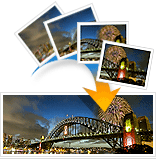 The new release of Windows Live Photo Gallery software lets you stitch panoramic photos on the desktop but you then need another service for putting those panoramic images on to the web.
Enter Magtoo Panorama Show, a web based tool for creating 360° panoramas from photographs captured using any digital camera. It also provides an interactive Flash viewer for you to easily embed panoramas in web pages.
MagToo Panorama Show can build both horizontal and vertical panoramas. You can also upload non-overlapping photos but in this case, the tool won’t merge your photos - it will just create one long image that can be embedded using the Flash viewer.
Related hack: Embed Large Screenshots in Web Pages
There’s a limitation though - you can stitch using IE for Windows only since the application is implemented as an ActiveX control. However, the final panorama image is rendered in Flash and can therefore be displayed using any web browser.
And not just for panoramas, you can also use the MagToo viewer to embed high-resolution photographs in web pages something similar to the Google Maps viewer.
MagToo Panorama Show - Thanks Larry Ferlazzo
You may also want to check this excellent guide by Kevin Purdy on how to turn normal looking photos into fantastic wide-angle landscapes.

Amit Agarwal
Google Developer Expert, Google Cloud Champion
Amit Agarwal is a Google Developer Expert in Google Workspace and Google Apps Script. He holds an engineering degree in Computer Science (I.I.T.) and is the first professional blogger in India.
Amit has developed several popular Google add-ons including Mail Merge for Gmail and Document Studio. Read more on Lifehacker and YourStory