
How to Hide Text Notes from Flickr Pictures Without Any Scripts

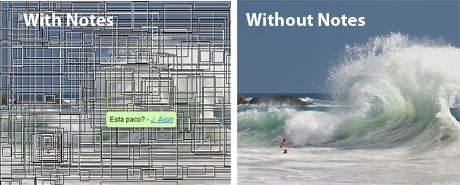
Photo notes is a feature very unique to Flickr - you can add text annotations to Flickr pictures and other can read your notes when they hover the mouse over that picture.
Though notes make it easy for you to highlight important areas of an image, they can virtually hide the actual image from view if they are too many in number - see example.
To momentarily disable notes from a Flickr picture, you can either apply the spaceball trick or this advice from Andrew - “put the cursor over a portion of the picture not covered by a note, then move the cursor off of the picture without passing over another note.”
All the notes will disappear for some time but they re-appear if you reload the page or move your cursor over the photo again. You have to be the owner of Flickr picture to remove text notes permanently. Thanks Jason and Joerg.

Amit Agarwal
Google Developer Expert, Google Cloud Champion
Amit Agarwal is a Google Developer Expert in Google Workspace and Google Apps Script. He holds an engineering degree in Computer Science (I.I.T.) and is the first professional blogger in India.
Amit has developed several popular Google add-ons including Mail Merge for Gmail and Document Studio. Read more on Lifehacker and YourStory























