Do you use Google AdSense on your site? Here are two tips to help improve the performance of AdSense Link Units on your site without changing any code.
1. Don’t Reuse Colors
When you create an Ad Link unit for your site, the background color of the Ad Link block should match with the color of other navigation elements on your web page.
For instance, on my home page, the AdSense Link Unit near the top navigation area has a dark grey background to match the horizontal navigation bar just above the Ad Link unit.
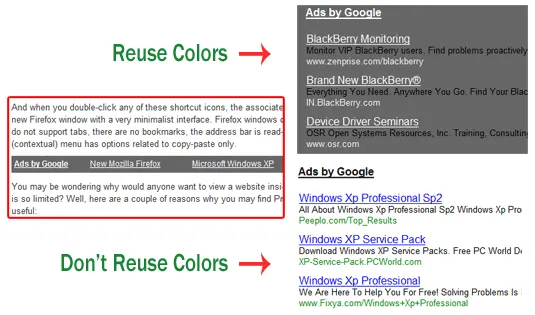
A problem with the above approach is that the landing page, which appears when a user clicks the ad link, will also have the same background color and that may not be very pleasing to the eyes of the visitor especially when you are using dark colors for Ad Links.
You can however override this default setting such that Google text ads on the target page are displayed using the default color palette (green URL and blue titles). For this, you need to edit your AdSense unit (AdSense Setup -> Manage Ads) and uncheck the setting "Reuse Colors".
2. Use Large Fonts
AdSense units with large font sizes tend to perform relatively better.

Therefore always consider using 4 links per unit (not 5) because with lesser number of links, AdSense will increase the font size and spacing (or line height) to fill the whole ad space and that may yield better results.
Google Ad Link units help you make the most out of limited space so don’t ignore them. And unlike the other text ads, Ad links can sometimes perform well in less visible locations also like the sidebar of your blog or even the footer. Keep experimenting.
Best of all, you can make all the above changes directly from the AdSense dashboard without having to edit your site template.
Related: Google AdSense Optimization Tips

Find this article at: http://www.labnol.org/internet/improve-performance-of-adsense-link-units/8524/
Tags: Archives, Google Adsense, Most Popular, Internet
Reader Comments
Hey, what is this post meant for, do not mind but this is beyond the standards of Labnol…
Written by Piyush on 05.12.09
Great tips but is their any method of increasing the font
Written by Final-yearprojects on 05.12.09
Thanks for the reminder. It’s always on my mind to uncheck that option but somehow I forgot to uncheck it.
Written by Raj on 05.12.09
Thanks for the tips, particularly about the uncheck the reuse colors. I place the my ad links below other links (e.g. label links), to try make them appear “natural”
Written by Michael on 05.12.09
Thanks for the good idea. That the way is setup my adsense on my blog. It looking more better rather than we use the default from google adsense.
Written by tommy on 05.12.09
Amit,
Did you receive your Adsense check for the month of March? I guess No. I request you to write an article on the current situation about payments to Indian via Blue Dart and throwing some alternate option to check. As a premium publisher from India, I think you should take that initiative and put some pressure on Google. Also, a word from you will answer millions of questions that are currently arising to all smaller publishers.
Hope you understand the situation.
Written by Sekhar on 05.13.09
And what about the color of the link in the ads. Should it match to the color of the text or should be different ?
Written by Gagan on 05.13.09
Hi amit, i want ask to you, how to make google adsense like your ads in up and bottom article with only 2 ads column. Are you premium adsense publisher?
Written by Toni on 05.13.09
You are the man.. Thanks for the AdSense Link Unit Tips.
Written by ThePicky on 05.13.09
Good guide to Adsence link unit
Written by Deep on 05.13.09
I usually use large fonts for ad link unit but reuse colors functions is the first time i have seen it, thanks
Written by Tinh on 05.16.09


