All email messages in your Gmail inbox have a permanent web address and you can add this URL to your bookmarks to quickly access that message in the future. You can save these message links in your task list or your meeting notes as they provide important context to the conversation.
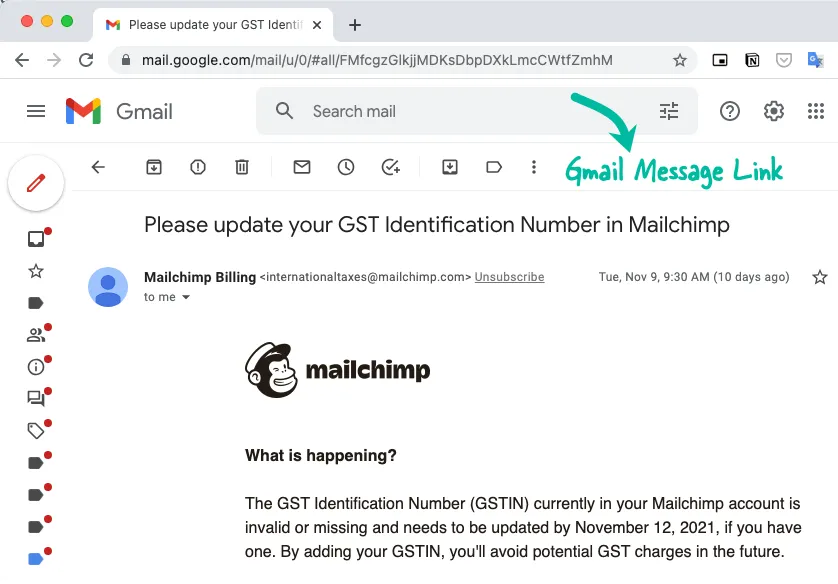
The URL of any email message is Gmail follows a standard format:
https://mail.google.com/mail/u/<<UserId>>/#label/<<Label>>/<<UniqueId>>The UserId is the sequential ID of the currently-logged Gmail account (default is 0). The Label is the name of the Gmail label that the message is in (or use all). The UniqueId is a unique ID that Gmail assigns to each message.
The key here is the UniqueId that is internally assigned by Gmail.
Get Gmail Message Links with Google Apps Script
When you send an email with Google Apps Script, the Gmail API returns a unique ID that you can use to determine the URL of the email message in your sent items.
Here’s a simple procedure to send an email that is base64 encoded.
const sendGmailMessage = (mimeText) => {
  const GMAIL_API = 'https://gmail.googleapis.com/upload/gmail/v1/users/me/messages/send';
  const params = {
    method: 'POST',
    contentType: 'message/rfc822',
    headers: {
      Authorization: `Bearer ${ScriptApp.getOAuthToken()}`
    },
    payload: mimeText
  };
  const response = UrlFetchApp.fetch(GMAIL_API, params);
  const { id: messageId } = JSON.parse(response.getContentText());
  return messageId;
};
Now that you have the messageId of the outgoing email message, there are at least three ways to get the URL (permalink) of the email message:
Option 1: Use the standard URL format
const getEmailMessageUrl = (messageId) => {
  return `https://mail.google.com/mail/u/0/#all/${messageId}`;
};
Option 2: Use Apps Script to get the email thread URL
In this approach, we get the associated thread of the email message and then get the URL of the first message in the thread.
const getThreadUrl = (messageId) => {
  const message = GmailApp.getMessageById(messageId);
  return message.getThread().getPermalink();
};
Option 3: Use the Message-Id in Email Header
This is my favorite approach because it is the most reliable. When you send an email message, a unique message ID is assigned to the email message by the sending service. This message ID is stored in the Message-Id header of the email message and is used by your email client to group messages in the same conversation.
Gmail provides a special rfc822msgid search operator to search emails by message ID and we can use this search operator to get the URL of the email message.
const getMessageUrl = (messageId) => {
  const message = GmailApp.getMessageById(messageId);
  const rfc822Id = message.getHeader('Message-Id');
  const searchQuery = `rfc822msgid:<${rfc822Id}>`;
  return `https://mail.google.com/mail/u/0/#search/${searchQuery}`;
};
Related: Get a second email address with your @gmail address






