While you can use images of virtually any size as backgrounds for your mobile phone or your computer desktop, it’s always a good idea to download wallpapers that exactly match the screen resolution as then the screen won’t cut any parts of you beautiful wallpaper nor the image will be stretched to fit the screen.
You probably know that with Google Images, you can find pictures by size. For instance, if your desktop screen resolution is 1680×1050, specify the dimensions in the query – imagesize:[width]x[height] keyword(s) – and it will only display wallpapers that exactly fit that size.
What’s Special About Wallpaper Search in Bing!

Finding the screen resolution of your mobile phone or your desktop screen is easy but here’s a quick tip that won’t even require you to worry about the resolution but you’ll still get perfect-sized wallpapers that you are looking for.
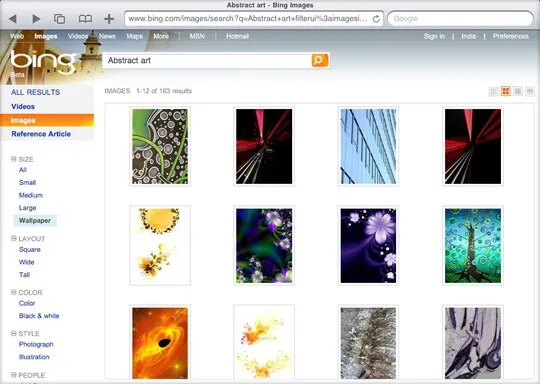
Step 1. Go to bing.com/images and search for some pictures (let’s say you’re looking for “abstract art” wallpapers).
Step 2. Once you have the first set of images, click Size –> Wallpaper in the sidebar.
Bing will smartly filter all the images that exactly match your current screen resolution without you having to specify the pixels in the search query.
Find Wallpapers from the Mobile Phone
The same trick works for mobile phones as well but there’s a small problem – when you open Bing.com in the browser of your mobile phone, it will automatically redirect to the m.bing.com and it doesn’t have the “wallpaper” search feature.
The workaround is simple though. When you are on the mobile version of bing.com, scroll down and click the link that says “desktop” – it will then switch to the regular desktop version of Bing on your mobile. Now when you use image search, Bing will automatically use the resolution of your mobile phone for wallpapers.
Update: You can also use this tip to find perfect-sized wallpapers for your iPad – just open bing.com on the iPad and use the “wallpaper” option.
Related: See some more Tips and Tricks for Bing

Find this article at: http://labnol.org/?p=13650


Reader Comments
Sorry, bro but it doesn’t work for iPhone.
Written by Ankit on 05.11.10
Ankit – I think it will work – I just checked using the iPhone user agent in Safari.
Open m.bing.com inside the iPhone and switch to the Images tab. Then select the “desktop” link at the bottom and you’ll get the wallpaper option.
Written by Amit on 05.11.10
Google has this kind of option from long time.
Written by nilesh on 05.11.10
Nilesh – There’s a difference between Google and Bing.
Google does have an option to find images that match a particular size but with Bing, you don’t need to specify the size – it can automatically pull the screen resolution of the device that you are searching on.
Also, Bing Image search is better and more user friendly than Google.
Written by Amit on 05.11.10
This doesn’t work for my dual monitors, but it would be a cool feature if I only had one monitor!
Written by Melissa on 05.11.10
Too bad bing doesn’t support dual and/or multi monitor resolutions!
Written by zugzug on 05.11.10
It doesn’t work for multi-monitor set-ups.
Written by Jim on 05.11.10
This is wrong – what if I want to find desktop wallpapers for my mobile phone but I am searching for them using my laptop ?
I hate searches and websites that automatically assume that what I am currently using and where I am located is what I want…
eg. Just because I am in Spain does not mean I am spanish wanting to read websites in spanish…
eg. Just because I am searching using a laptop does not mean I am searching for laptop screen resolutions…
Webmasters and Bing take note!
By the way, Google is way ahead in image search, and everyone knows that – why this website is trying to promote Bing crap is a mystery…
The other advice here is wrong, I say don’t get the image resolution that matches your current screen if your current screen has a low resolution – eg. 1280×800 (widescreen), instead get the best that you can find eg. 1920×1200 (widescreen) that way your collection will serve you good in the future as you will most certainly upgrade your screen resolution / computer in the future… saves having to go finding all those desktops wallpapers all over again…
Written by Alpo on 05.12.10
I have two monitor setup at office, It does not work for that, any hacks?
Written by Kuldeep on 05.13.10


