Add Your Current Location to Gmail Signatures Automatically

Gmail users who travel frequently will simply love this. You can now instruct Gmail to automatically add your current geographic location to all your outgoing email messages so that recipients get to know where you are at the moment.

Gmail takes the IP address of the computer from where you are sending that email and uses it to determine the city / state / country from where you are writing that email.

How to Add Location in Gmail email Signatures

Step 1: Enable the Location in Signature module from the Lab Settings of your Gmail / Google Apps of Gmail.

signature-location

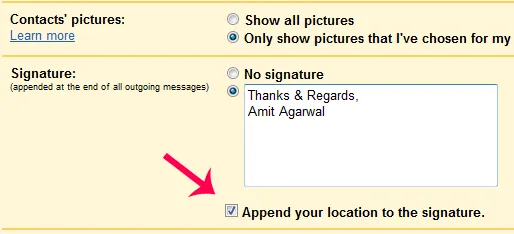
Step 2: Open the Setting tab of Gmail and select the check box that says "Append your location to the signature".

gmail-signature

That’s it. Here how the signature would look like on the recipients computer. So instead of saying "Sent from iPhone" or "Sent from BlackBerry", your email signatures could now says "Sent from New Delhi using iPhone" or something similar.(see update)

City detection based on IP addresses may not be 100% accurate but you can always modify the detected value before sending the email.
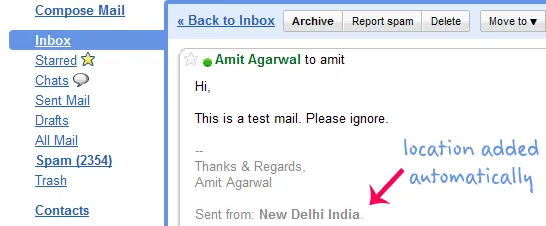
email-location

Marco Bonechi, the Google engineer who coded the Location module from Gmail, recommends using the location module with Google Gears for more accurate location detection since it uses wi-fi access point signals to recognize your current location.

Update: Gmail location signature is not available on mobile phone based browsers (like Opera Mini for BlackBerry) so you can’t have custom signatures for emails sent through mobile phones even if you use the regular Gmail interface.


Find this article at: http://www.labnol.org/internet/email/add-location-to-gmail-email-signature/7243/

Tags: , , , , , , Email

Reader Comments

I think that is the location we set in gmail at the time of configuration or it will change depending on IP address. Please confirm.

Google uses the IP address of your computer to determine your current physical location. It may or may not be the same as the location that you’ve set in your initial gmail configuration.

This is gonna be very useful for business men who travels alot and they can confirm their stay at particular place in a subtle way to others by using this feature of Gmail

Amit, Thanks for the information. Agree with Fasil that it will help a lot to the business persons as well as bloggers who travel a lot for conferences and meetings.

Thanks Amit, for sharing this!

I was wondering to get my location as “Northampton Eng United Kingdom.” whereas I am sitting in Cambourne, a place almost 51 miles from Northampton?

So instead of saying “Sent from iPhone” or “Sent from BlackBerry”, your email signatures could now says “Sent from New Delhi using iPhone” or something similar.

This isn’t strictly true. The modified signature is only available in Gmail’s AJAX interface, as are most Gmail Labs features, so it doesn’t get appended to messages sent from Blackberry or iPhone devices. Even if you use Gmail’s web interface rather than IMAP (which is where that “Sent from iPhone” signature is usually appended) it won’t work. And even if it did, you can’t change the format, so it could never actually say “Sent from New Delhi using iPhone” at the moment.

Phew Amit. Looks like you will be having a tough time ahead to filter authentic mails from the spam that you have ;-)

Thanks for informing about this tip.

Thank you Tony. I just tried that on Opera Mini and as you observed, the location was not added. So this feature at the moment is limited only for desktop based browsers. Thanks for the correction.

Interesting thing is that if you already have location [e.g. Pune, India], gmail does not append location. I had |Pune|India| in my location, so no repeat appending by gmail.

thanks Amit….this will be great for land surveyors!

Doesn’t seem to work for me. I tried to enable the feature the location showed up as San Francisco, California, United States. Whereas I am sitting 3000 miles away in New Jersey!!!

the feature itself has not been enabled for me!!!

All of you wondering why Gmail places you hundreds or even thousands of miles off your real location: make sure you are not sitting behind a NATting corporate firewall. Gmail has no way of knowing if your traffic is routed from N.Y. to S.F. or from Newcastle to London inside the corporate network before it hits the Internet.

Likewise Gmail locates me at Helsinki, Finland though I am sitting hundred miles north in Tampere, Finland. That’s just because our gateway is in Helsinki.

Just my 2 cents…

I don’t have option of “Append your location to the signature” below signature, I don’t found in settings.

Can u help. how to solve this prob.

Sanjay

The option does not show up for me neither. Maybe it was disabled temporaly until they fine tune the accuracy?


Google Custom Search