You have just come across a new website at example.com that offers an interesting software utility or an ebook for free. The offer is simple - you give them your email address and they’ll send you the download links over email.
Now while the website policy clearly states that they “won’t sell your email address to third-parties,” you aren’t feeling very comfortable sharing your private email address with a website that you’ve never heard about before. What do you do then?
Do you plan to skip the offer just because you’re worried that spam might hit your email Inbox? Well, stop worrying and get a disposable email address that will auto-expire after some hours (or some days).


There are quite a few websites that offer disposable email addresses for free but my favorite is 10minutemail.com. Just visit the and you’ll get a temporary email address that you can use anywhere on the web just like your regular email address (you can even reply and forward message).
The email addresses will self-destruct after, you guessed it right, 10 minutes. They regularly switch their email server domains - you might have been allotted abc@hello.com today but the alias next day could become xyz@bye.com. This prevents forum administrators from blocking members that use temporary addresses.
When Disposable Email Addresses Aren’t Enough..
You may use disposable email addresses when filling out online surveys, registration forms, comment forms, etc. but when you need to share your email address on a public website (like Twitter), disposable addresses won’t help as they expire pretty soon.
You still have a couple of options though.
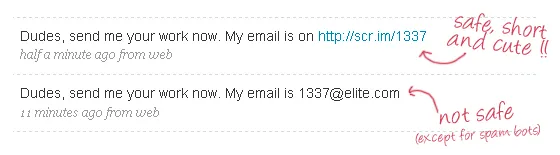
Scr.im will convert your email address into a short web address (URL). People will have to pass a small CAPTCHA test to see your actual email address (see example).
Another service that can potentially save your email from spammers is reCAPTCHA. The service will require “human” users to solve a CAPTCHA for them to see your full email address in plain text. Here’s a demo:
Please click here to reveal the full email address.
Spambox.us will let you generate temporary email addresses that can last up to an year. Any email message that’s sent to this temporary address will be auto-forwarded to your main Inbox and, if you think you are getting spammed, you can simply cancel your Spambox address.
 Then you have whspr.me that turns email address into a web forms. Anyone can reach you over email by simply writing the message in this form. You can delete the email form manually anytime or set it to auto-expire after ‘n’ days.
If you have a Google Account, you can check the setting in your Google Profile that says - “allow people to contact me without showing my email address”. Other users who are logged into their Google Accounts can then send you direct messages - see the “send a message” link in my Google profile for a live example.
And finally the most common method – you can consider creating an image of your email address using labelgen (or even Facebook). Most spam bots won’t notice your email address while humans can easily read the address without having to solve complex CAPTCHAs.
Email Cover can also help you mask your precious email address but, unlike regular email to image converters, it doesn’t use straight fonts so your address will possibly stay protected from spammers who are smart enough to perform OCR. See example:

Related tips: Hide your Email Address on Websites






