You may have developed your website using an expensive “what you see is what you get” editor but there’s no guarantee that site visitors “will get the website as you see it”.
You will need to extensively test the website to ensure that visitors have a comfortable stay and don’t leave your site in a jiffy. And here are some useful tools to help you completely check your website:
Browsershots is an online service that automatically captures full page screenshot images of your website in various browsers across all different OS platforms. You also have the option to preview the website design in browsers with or without Flash, Java and JavaScript.
 Browsershots is extremely popular and you may therefore have to wait a few minutes for this service to render screenshots of your website.
IE NetRenderer is another service that’s much faster than Browsershots but it can check the rendering only for different versions of Internet Explorer. Mac oriented websites can try BrowsrCamp which is like Browsershots but for the Mac OS browsers only.
To see how your website appears on the small screens of mobile phones like the BlackBerry or Windows Mobile, check out BrowserCam. Another good option is the Opera Simulator that lets you experience a mobile version of Opera from the desktop.
Related: Use Opera Simulator to Unblock Restricted Websites
Some people are still using slow dial-up connections and their population in not insignificant especially in the developing world. You therefore need to make sure that the average loading time of your HTML web pages, along with all the Javascript Ads, Images, CSS, Flash animations, etc., is within reasonable limits.
Pingdom is a free online service that mimics the way a page is loaded in the web browser. It shows statistics (size, loading time) for every object on the web page so you know about the culprits who may slow down the website.
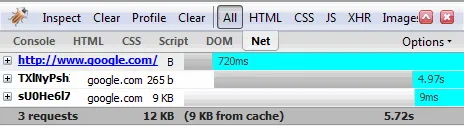
Alternatively, you could use Firebug in Firefox to detect elements on your web page that are increasing the load time of your web pages (press F12, Goto All -> Net).
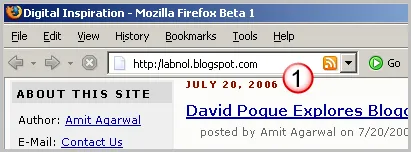
For website and blogs that syndicate content via RSS feeds, load the website in IE or Firefox and look for that orange XML icon near the browser address bar. This ensures that other online services can successfully auto-discover RSS feeds give your site address.
If you have added email forms to your website - try some combinations in the form address field. For instance, is the email message delivered successfully if visitors add a semicolon instead of a comma to separate two or more email addresses.
You may also want to print some of your web pages to the local printer or save them as PDF to ensure that the Print CSS of your site is stripping the non-essential stuff like the sidebars and the ads.

For accessibility, load the website inside html2txt to ensure that screen readers can interpret your website. This is an online Lynx simulator (text-only browser) and will also help you understand how your website appears to Google spiders and other search engine bots.
And finally, validate your web pages against online HTML validation and clean-up service like the W3C HTML Validator and HTML Tidy. The former service help you check the website for conformance to W3C HTML standards while the latter is for cleaning up HTML source files that contain lot of nested tags.






