Turn Off Picture Thumbnails in WordPress & Save Web Server Space

When you publish a blog post that has a screenshot or a picture, WordPress will automatically create two image thumbnails in your uploads folder on the web server.
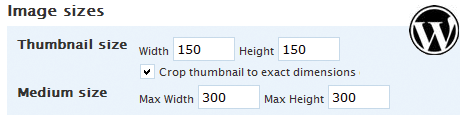
Image thumbnails are required for photo galleries or if you are embedding a smaller image in the blog post that links to the full size version but in other cases, these “extra thumbnails” simply occupy precious space on your web server.
To permanently turn off these image thumbnails, Gene suggested a simple workaround in this WordPress Tips article.
Open your WordPress dashboard, go to Settings -> Miscellaneous Settings and clear the height and width fields under “Thumbnail Size” and “Medium Size.” Save changes and WordPress will no longer create thumbnails.

Amit Agarwal
Google Developer Expert, Google Cloud Champion
Amit Agarwal is a Google Developer Expert in Google Workspace and Google Apps Script. He holds an engineering degree in Computer Science (I.I.T.) and is the first professional blogger in India.
Amit has developed several popular Google add-ons including Mail Merge for Gmail and Document Studio. Read more on Lifehacker and YourStory