Digital Inspiration

about    faq    contact

Move FeedBurner RSS Feeds From One Account to Another

transfer-feedburner-rss-feeds

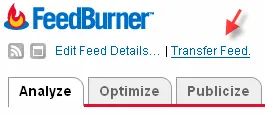
FeedBurner has introduced a new "Transfer Feed" features that lets you move RSS feeds from one FeedBurner account to another including the email subscribers.

This is useful when you are planning to change your FeedBurner user name or selling the blog that is syndicated via FeedBurner. Instead of transferring the full FeedBurner account to the new owner, just pass on the feed ownership.

You have to type the email address of the publisher to who you wish to transfer the feed. He will immediately get a link to claim ownership of your feed.

In case you are a member of the FeedBurner Ad network, the method for transferring feeds is slightly complicated.

For more, check out the FeedBurner Guide.

Email This   Print Article   Save as PDF   Subscribe   Translate 

Published on January 29, 2008 under Blogging, Internet
Tags: , , ,

Recommended Google Software:

You may also like to read ..

 · Google AdSense Ads In FeedBurner RSS Feeds May Be Coming Soon
 · FeedBurner RSS Feeds Are Not in Google Search Results Anymore
 · Increase Your Blog’s RSS Subscriber Count with Bloglines Tools
 · Screenshots of Google AdSense Ads in FeedBurner RSS Feeds
 · Google Adsense To Replace FeedBurner RSS Advertising

Reader Comments

#1 Robin 01.29.08

So that’s how that new link above at feedburner dashboard. Thanks Amit.

#2 Judi Sohn 01.29.08

Actually, this feature has been around a bit. I transferred 2 feeds to a different account months ago.

Add a Comment

If you have a question that is not related to the above discussion, please post your question in the message board for quick answers. All comments are moderated.


Joing the Facebook Group

Visit Help Central


© 2008 Digital Inspiration - Technology, à la Carte | Mobile Edition | Videos | Terms

The articles are copyrighted to Amit Agarwal and can only be reproduced given the author's permission.

My Google  Netvibes  My Yahoo!  Windows Live  Bloglines  Newsgator  

Skip to top of the page ^^


