Let’s assume that you are the administrator of a team blog that has multiple guest authors.
The revenue sharing arrangement is such that all writers get to keep a fixed percentage of the actual AdSense revenue generated from articles that they have written.
This arrangement, from the perspective of team members, maybe better than dividing AdSense revenue based on pageviews because the author is getting exactly what he earned. You can have less number of pageviews but if the CPM of your niche is high, it kind of balances out.
Now to put such a thing in place, you have two options – either ask all the authors to open separate AdSense accounts and send you their ad tags or better still, you can have just use one AdSense account (your own) and create separate channels for all authors. Let’s see how:
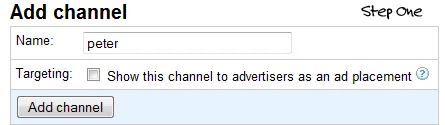
Say your blog (hosted on WordPress or Blogger) has three authors – Sam, Peter and Matt. Go to your AdSense dashboard and create three separate custom channels – give each channel a name that matches with the name of author.
Now create three different ad units (of the same format) but assign a different channel to each of them. You can follow a naming convention like Leaderboard_Peter, Leaderboard_Sam, etc.
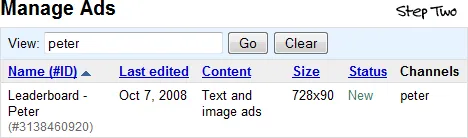
Get the AdSense code corresponding to the AdSense channel you just created and it will look something like this.
<script type\="text/javascript"\><!--
  google_ad_client = "pub-xyz";
  /\* Leaderboard - Peter \*/
  google_ad_slot = "123789";
  google_ad_width = 728;
  google_ad_height = 90;
//-->
</script\>
<script type\="text/javascript"
 src\="http://pagead2.googlesyndication.com/pagead/show_ads.js"\>
</script\>
The code will be exactly similar for all other ad units (per author) with one exception – the value of google_ad_slot will vary depending on the author and this is something that will help us determine the exact AdSense earnings of different authors.
To get the author name of a post on WordPress or Blogger, you can use the following code:
- _Old Classic Blogger_: <$BlogItemAuthorNickname$>- _New Blogger_: <data:post.author/>- _WordPress Blogs_: <?php get_the_author(); ?> – you may even consider suing get_the_author_login();Now all you need to do is write a simple piece of JavaScript code that maps the author name and google_ad_slot values correctly. Here’s an example with WordPress:
<?php function get_ad_codes($author) {
 if($author == 'peter')
   return '123789';
 elseif ($author=='sam')
   return '987878';
 else // default, no author found
   return '964743';
} ?>
Now the AdSense code in your WordPress blog template will be something like this:
<script type\="text/javascript"\><!--
  google_ad_client = "pub-xyz";
  google_ad_slot = "<?php echo get_ad_codes(get_the_author());?>";
  google_ad_width = 728;
  google_ad_height = 90;
//-->
</script\>
<script type\="text/javascript"
 src\="http://pagead2.googlesyndication.com/pagead/show_ads.js"\>
</script\>
Blogger Templates support only JavaScript (no PHP) so you’ll have to slightly modify the code above to make it work with Blogger.
When the payment cycles is near, group the AdSense report by channels and there you’ve the exact earning data per author.
The upcoming AdSense reports in Analytics will tell you the earnings per URL but you’ll still need a different mechanism (like the one above) to find revenue per author.






